
If you run a small business, the paperwork never stops. Quotes, contracts, NDAs, invoices, onboarding forms — each one eats twenty minutes you don’t have. AI document automation software for small business promises to shrink that work to minutes: draft it, fill it, send it, get it signed, and chase the stragglers. I opened up eight tools this week and read their real pricing pages. Some are worth every cent; a couple are priced like they forgot who their customer is.
Inside: what document automation covers, a price table, a verdict on each tool, a one-hour setup playbook, honest math on the “10 hours a week” claim, and owner FAQs.
TL;DR: For proposals and contracts, start with PandaDoc ($19/user/month) or Zoho Writer + Zoho Sign (effectively free at low volume). For signatures only, DocuSign Personal ($10/month) or signNow ($8/user/month) do the job for less. If forms turn into filled PDFs, Jotform’s free tier covers 10 signed documents a month. Skip Formstack unless you send 250+ documents a month. Under ten documents a month, you probably don’t need paid software at all.

How we tested (and what we didn’t)
I opened each tool’s official site and pricing page on 17 November 2026 and recorded list prices — annual billing unless stated, all in US dollars. I compared them on the same questions: what does the free tier cover, what does a three-person team pay, and where does the price jump? What I didn’t do: run card-walled trials or push live client documents through all eight tools. Images here are official vendor images where I could get one, and labeled illustrations elsewhere.
What is AI document automation, really?
“Document automation” means three different jobs, and most roundups mash them together. Generate — the tool writes the document for you, from a description or your client details. PandaDoc, Zoho Writer with Zia, Google Docs with Gemini, and AiDocX live here. Process — the tool reads documents that already exist and pulls the useful bits out: invoices arriving as PDFs, or a form submission that must become a filled-in contract. Formstack Documents and Jotform live here. Manage and sign — the tool routes the document, collects signatures, tracks who opened it, and nags the people who haven’t signed. DocuSign, signNow, and Zoho Sign live here.
The 8 tools at a glance
| Tool | Main job | Free tier | Paid price (annual billing) | Best for |
|---|---|---|---|---|
| PandaDoc | Generate + sign | Free e-signature tier | $19/user/mo Essentials; $49 Business | Proposals |
| DocuSign | Sign + manage | None (trial) | $10/mo Personal; $25 Standard; $40 Business Pro | Signing |
| airSlate signNow | Sign + light workflow | 7-day trial | $8/user/mo Business; $15 Premium | Cheap signing |
| Jotform (+ Sign) | Forms → signed PDFs | 10 signed docs/mo | $34/mo Bronze; $39 Silver; $99 Gold | Form paperwork |
| Zoho Writer + Sign | Generate + sign | Writer free; Sign 5 envelopes/mo | Credits from $0.05/doc; Sign $10/user/mo | Lowest cost |
| Formstack Documents | Generate from data | None (14-day trial) | Suite $250/mo | High volume |
| AiDocX | Generate + sign + track | 5 e-signatures/mo | $6/mo Basic; $29/user/mo Pro | Cheap all-in-one |
| Google Docs + Gemini | Generate + draft | Free personal Docs | Workspace $7–$14/user/mo | $0 start |
Prices checked on the vendors’ own pricing pages, 17 November 2026.
The 8 tools, one by one
1. PandaDoc — best for proposals that need to close
Verdict: worth it if you send proposals every week; skip it if you just need a signature.
PandaDoc is the proposal machine. Clients sign inside the document and can pay by card right there. The free tier covers e-signatures only — no builder, no templates. Essentials is $19 per user per month on annual billing ($35 monthly), capped at 5 templates. Pricing tables and payment collection only unlock on Business at $49 per user per month ($65 monthly); three people on Business is $147 a month. Note: $35/$65 are the monthly-billing prices — annual is $19/$49.

2. DocuSign — best if signing is the whole job
Verdict: the safest signature in the business, fairly priced — but it won’t write your documents.
Personal is $10 a month on annual billing ($120 a year, or $15 month-to-month) and covers 5 envelopes a month for one user. Standard is $25 per user per month annually with 10 envelopes per user per month. Business Pro is $40 per user per month annually, adding payments, bulk send, and web forms. It signs and tracks brilliantly, but it doesn’t draft contracts. For a handful of agreements a month, Personal or Standard is the pick.
3. airSlate signNow — cheapest proper signing, with one trap
Verdict: the best-value signer on this list — as long as you count your envelopes.
signNow does roughly what DocuSign does for noticeably less. Business is $8 per user per month on annual billing ($20 monthly), Business Premium is $15, Enterprise is $30. The trap: every plan caps you at 100 signature invites per user per year, with overages of about $0.96 per extra invite on Business, rising to $1.80 on Premium and $3.60 on Enterprise. A three-signer contract sent twelve times eats 36 invites. Note: the full workflow platform (altaFlow) is a different product — from $1.40 per document, Growth at $399 a month — not a small-business price.

4. Jotform — best when a form is where the paperwork starts
Verdict: if your documents start as a form somebody fills in, this is the most practical tool here.
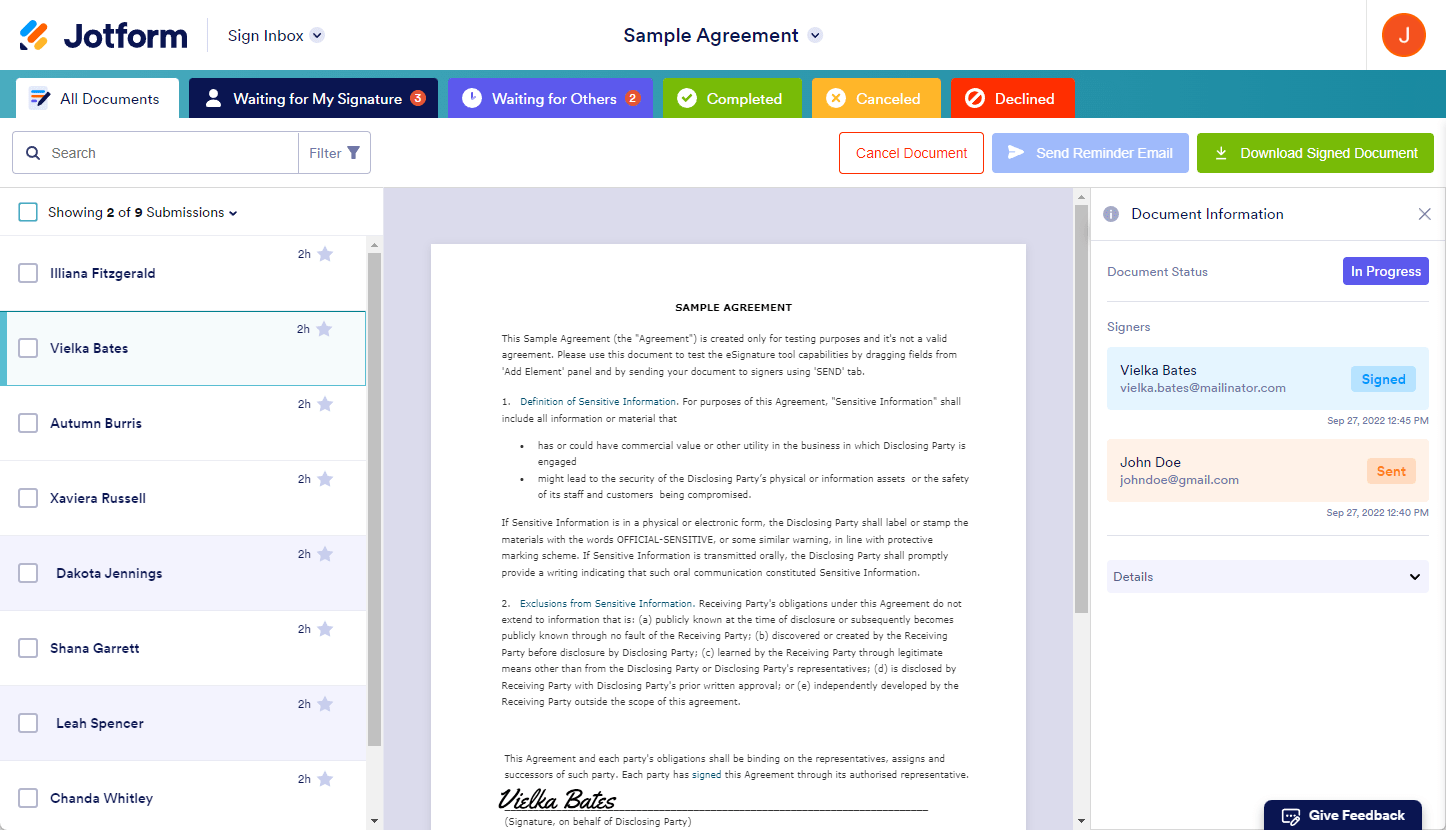
Your client fills in a form and Jotform turns the answers into a finished PDF, then routes it for signature. The free Starter plan covers 5 forms, 100 submissions a month, and 10 signed documents a month. Bronze is $34 a month on annual billing ($39 monthly) with 100 signed documents a month; Silver is $39 ($49 monthly) with 250; Gold is $99 ($129 monthly) with 1,000 and HIPAA features. Warning: every plan below Enterprise is single-user, and HIPAA only arrives at Gold.
5. Zoho Writer + Zoho Sign — the lowest-cost real stack
Verdict: the cheapest way to generate and sign properly. If you already use Zoho, this is a no-brainer.
The editor is free — unlimited documents, all features — and you only pay when Writer generates documents from your data. Every organization gets 200 to 1,000 free automation credits a month; after that it’s $0.05 a credit up to 4,000, then $0.02, then $0.01. Most documents cost one credit: 100 a month is free, 1,500 costs roughly $26. Zoho Sign pairs with it: free for one user and 5 envelopes a month, Standard at $10 per user per month annually (25 envelopes per user per month), Professional at $16 with unlimited manual envelopes, Enterprise at $22. Wrinkle: on Professional and Enterprise, API and bulk sends consume credits (five per send). For contracts sent by hand, that’s generation and signing for $0 to $10 a month.
6. Formstack Documents — powerful, but the price moved
Verdict: skip it unless you generate 250+ documents a month. The product is good; the new pricing isn’t built for you anymore.
Formstack Documents (the old WebMerge) merges data from a form, spreadsheet, or CRM into polished PDFs and Word files. Problem: Formstack no longer sells Documents on its own. You buy the Suite plan at $250 a month on annual billing ($299 monthly), with 250 document deliveries a month, three builder users, 100 forms, and unlimited e-signatures. Older price lists ($110/$220/$440) are from retired standalone plans — don’t budget against them. At $250 a month, a business sending 30 documents a month pays over $8 per document. Unless your volume is high, that money buys a lot of PandaDoc or Zoho.

7. AiDocX — the cheapest all-in-one, with a young-product caveat
Verdict: the best price here for generate-plus-sign-plus-track — and the least proven.
AiDocX is the new name in the top results: drafting, signing, and tracking in one tool. Starter is free with 5 e-signatures a month, 5 tracking links, and 50,000 AI tokens. Basic is $6 a month with 500,000 tokens and 20 e-signatures a month. Pro is $29 per user per month with unlimited e-signatures and 2,000,000 tokens; Business is $79 per user per month. Two things to know. First, the roundup ranking first for this keyword says “Pro from $6/month” — that’s wrong. Basic is $6; Pro is $29. Second, AiDocX is a young startup with almost no independent reviews, and its AI drafts are starting points, not legal advice. Try the free tier first.
8. Google Docs + Gemini — the $0 starting point (and it just got better)
Verdict: if you send fewer than ten documents a month, stop here. You may already own everything you need.
On Business Standard ($14 per user per month annually), Gemini drafts, rewrites, and summarizes right inside Docs, Sheets, and Meet. Business Starter is $7 per user per month, but Gemini there only works in Gmail and the Gemini app — you need Standard for Gemini in Docs. In October 2026, Google added file creation and editing inside Gemini. Limit: Google Docs doesn’t collect signatures or track opens. Pair it with a signer — DocuSign Personal, signNow, or Zoho Sign’s free tier — for under $15 a month.

The one-hour setup playbook (for a non-technical owner)
Minutes 0–15: clean up one template. Take the document you send most and strip out every client-specific detail, replacing names, dates, prices, and addresses with marked fields. Minutes 15–30: build the template in the tool. Upload your cleaned document, mark the fields, add your logo and payment details. Minutes 30–45: send a test to yourself. Use a second email address you control and walk the whole path — fill the form, receive the document, sign it, check the audit trail. Minutes 45–60: write down the workflow. One page: who sends what, who signs, what happens when someone doesn’t sign in three days (most tools can auto-remind — turn that on). Then send your next real document through the new flow.

Will this actually save you 10 hours a week? (Honest math)
Vendor pages love the “10 hours a week” line, so let’s do the arithmetic instead. Assume drafting and chasing a document by hand takes about 45 minutes, and a templated flow takes about 15.
| Documents a month | Hours saved per week |
|---|---|
| 10 | ~1.2 |
| 20 | ~2.3 |
| 40 | ~4.6 |
| 80 | ~9.2 |
The honest answer: most small businesses sending 10–20 documents a month will save roughly 1–3 hours a week, not 10. Ten hours a week is real, but only at high volume (60–80+ documents a month) or when signature-chasing is your bottleneck. Don’t buy a $49 seat expecting ten free hours. Buy for your volume and measure for two weeks.
FAQ
What is AI document automation software?
Software that creates, fills in, routes, and signs business documents with minimal typing. One template; the software merges the data, sends it for signature, and tracks signing.
How much does AI document automation software cost for a small business?
From $0 to about $50 a month for most small businesses. Free tiers cover low volumes (Zoho Writer, Jotform’s 10 signed documents a month, AiDocX’s 5 e-signatures). Paid plans start at $6–$10 a month for signing, $19–$49 for proposal tools.
Do I need document automation if I only send a few documents a month?
Probably not as a paid product. Under ten documents a month, Google Docs with Gemini (or Zoho Writer’s free tier) plus a free signing tier covers you.
Is an AI-generated contract legally binding?
The signature part is settled: electronic signatures are legally binding in the US under the ESIGN Act and UETA, and all the tools here produce an audit trail. The wording needs care — an AI draft is a starting point, not legal advice. For high-value agreements, have a lawyer review your template.
DocuSign vs PandaDoc — which is better for a small business?
DocuSign wins if you only need signatures — cheaper at the low end, and every client recognizes it. PandaDoc wins if you send proposals, because templates, pricing tables, and payment collection live in the same document. If you do both, PandaDoc Essentials is usually the better single buy.
Can I automate documents for free?
Yes, up to a point. Zoho Writer’s editor and automation credits are free at low volume, Jotform’s free tier includes 10 signed documents a month, AiDocX’s free tier includes 5 e-signatures a month, and Google Docs is free. A business sending a handful a month may never pay.
Final verdict
If I had to pick one stack for a typical small business, it would be Zoho Writer plus Zoho Sign for the budget-conscious, and PandaDoc Essentials for anyone whose proposals are the business. DocuSign Personal is the right call when signatures are the whole job. The bigger point: stop retyping. Pick the tool that matches the documents you actually send, spend one hour setting up a single clean template, and send your next document through it. For the wider productivity stack, see our best AI productivity tools for small business guide, plus our guides to AI meeting notes tools, AI data entry automation, and AI email management. Read more about how we work.
Enjoying ToolsBizAI guides?
Add us as a Preferred Source on Google — you'll see our latest tools and guides first in Search, Top Stories, and AI Overviews.
Get One Useful AI Tool Tip Every Week
One practical AI tool tip in your inbox every week. No spam, unsubscribe anytime.

We’re the team behind ToolsBizAI. We hands-on test AI tools for small businesses — signing up for free plans, taking real screenshots, and fact-checking every claim before publishing. Our guides cover marketing, customer support, and day-to-day operations.