

Here’s a number that should change how you think about your website: 51% of B2B software buyers now start their vendor research inside an AI chatbot instead of Google — up from 29% a year earlier. (That’s G2’s 2026 Buyer Behavior Report, via salarybox.in.) Your customers already prefer chatting to searching. The only question is whether they chat with your bot or someone else’s.
We opened the official sites of 10 AI chatbot tools to find the best AI chatbots for small business, read every pricing page line by line, and screenshotted what we saw — so you don’t learn the expensive way.
The short answer: the best AI chatbots for small business in 2026 are Tidio if you want AI answers on a $0 budget, Crisp if you want the cheapest flat-rate live chat with AI available, and Intercom’s Fin if you want the best resolution quality and can pay per resolved conversation. Most one-to-five-person businesses should start free and upgrade only when chat volume forces it. Full breakdown with verified prices below.
In this guide you’ll find: our verdict on all 10 tools, every price verified October 13, 2026, what each free tier really includes, six hidden costs no competitor lists, a comparison table, budget picks at $0 / under $50 / scale-up, and what yesterday’s Hiver Omni launch signals.
What counts as an AI chatbot vs a basic live-chat widget? An AI chatbot understands the visitor’s question and generates an answer from your site content. A live-chat widget just routes visitors to a human — or a scripted button menu. Privacy: transcripts can contain names, emails, and order details, so check your provider’s GDPR and data-processing terms before going live. Disclosure: tell visitors it’s a bot — hiding it backfires the moment they realize they’ve been talking to software.
🚨 Happening now: the chatbot grew up yesterday
On October 12, 2026 — literally yesterday — Hiver launched Hiver Omni, an “agentic” support platform where AI agents pull context across your systems, follow your support processes, and resolve multi-step requests with human handoffs. Hiver claims 10,000+ teams use its products; it disclosed no pricing and no resolution rates, so file those numbers under “vendor claims.” The direction is what matters: the industry is moving past FAQ bots toward agents that do things.
Five days earlier, OpenAI rolled out GPT-6’s Intelligent UI (October 7): ChatGPT now answers with tappable buttons, forms, and interactive charts inside the reply, for a claimed 1.2 billion weekly users. Your customers are being trained — daily — to expect conversations that do stuff. A 2019-style “type your question” widget now feels like a fax machine.
TL;DR — our picks
- Best $0 start: Tidio — the only free tier with real AI conversations included (50 Lyro AI chats, lifetime). No credit card.
- Cheapest flat-rate chat: Crisp Mini at $45/mo — unlimited conversations, no per-seat math, Shopify/WooCommerce native.
- Best under-$50 team plan: Freshchat Growth at $19/agent/mo — WhatsApp and Messenger included; watch the Freddy AI meter.
- Best resolution quality at scale: Intercom’s Fin at $0.99 per resolved conversation — you pay only when the bot actually solves it.
- Best for tinkerers: Botpress — 100 free AI conversations a month and no separate LLM bill, ever.
- Skip: Drift — Salesloft retired the brand; any 2026 list still recommending it is stale. Think twice about HubSpot’s Customer Agent unless you’re already on HubSpot — $90/seat plus mandatory $1,500 onboarding.
How we tested (so you know what “we checked” actually means)
- We audited all 10 tools on October 13, 2026: opened each official site, read the full pricing page, screenshotted what we saw. Every price here was verified that day — not copied from an old listicle.
- We checked each free tier’s real limits (conversation caps, AI credits, branding) and what signup demands: credit card? phone number? just an email?
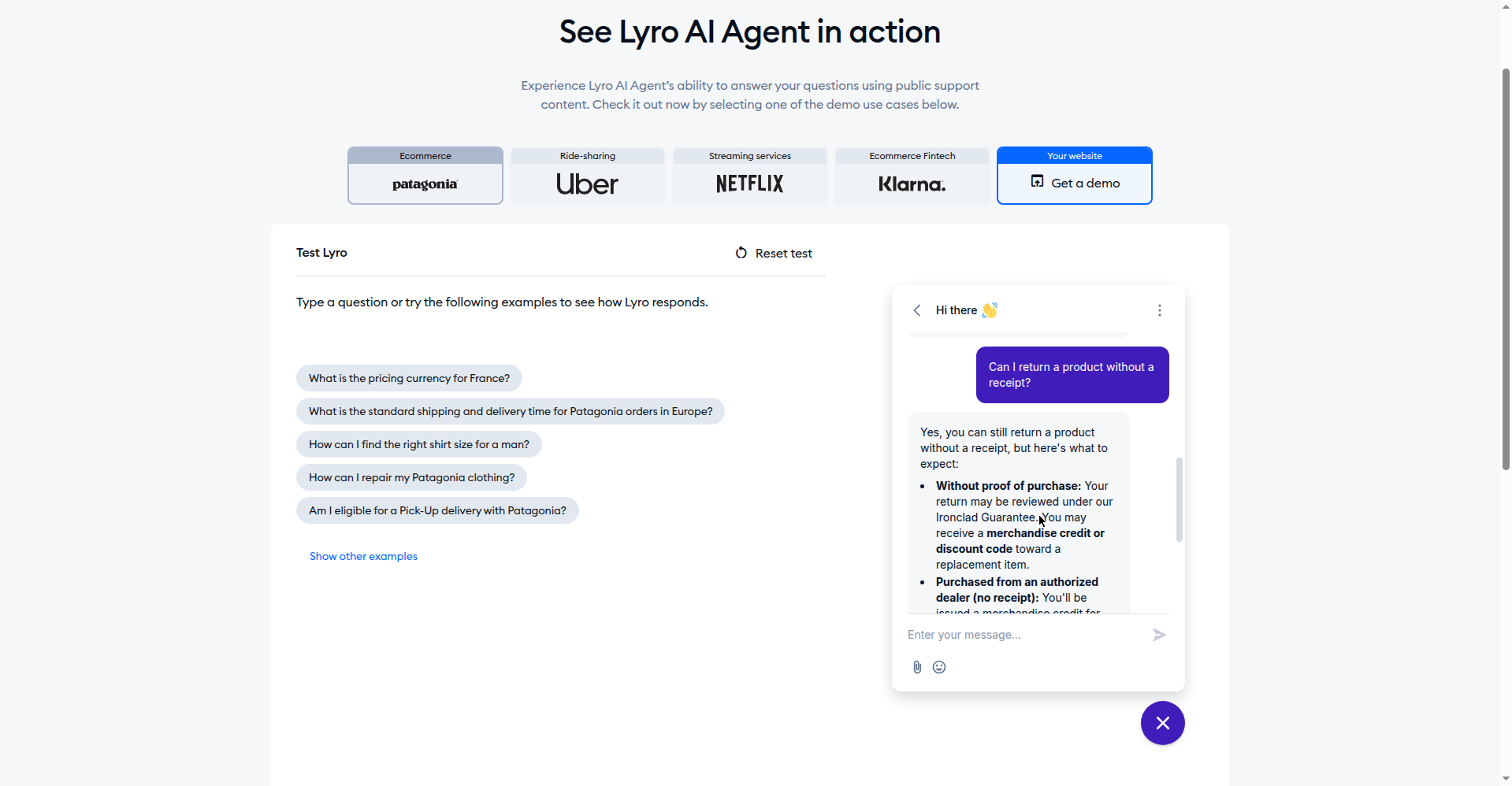
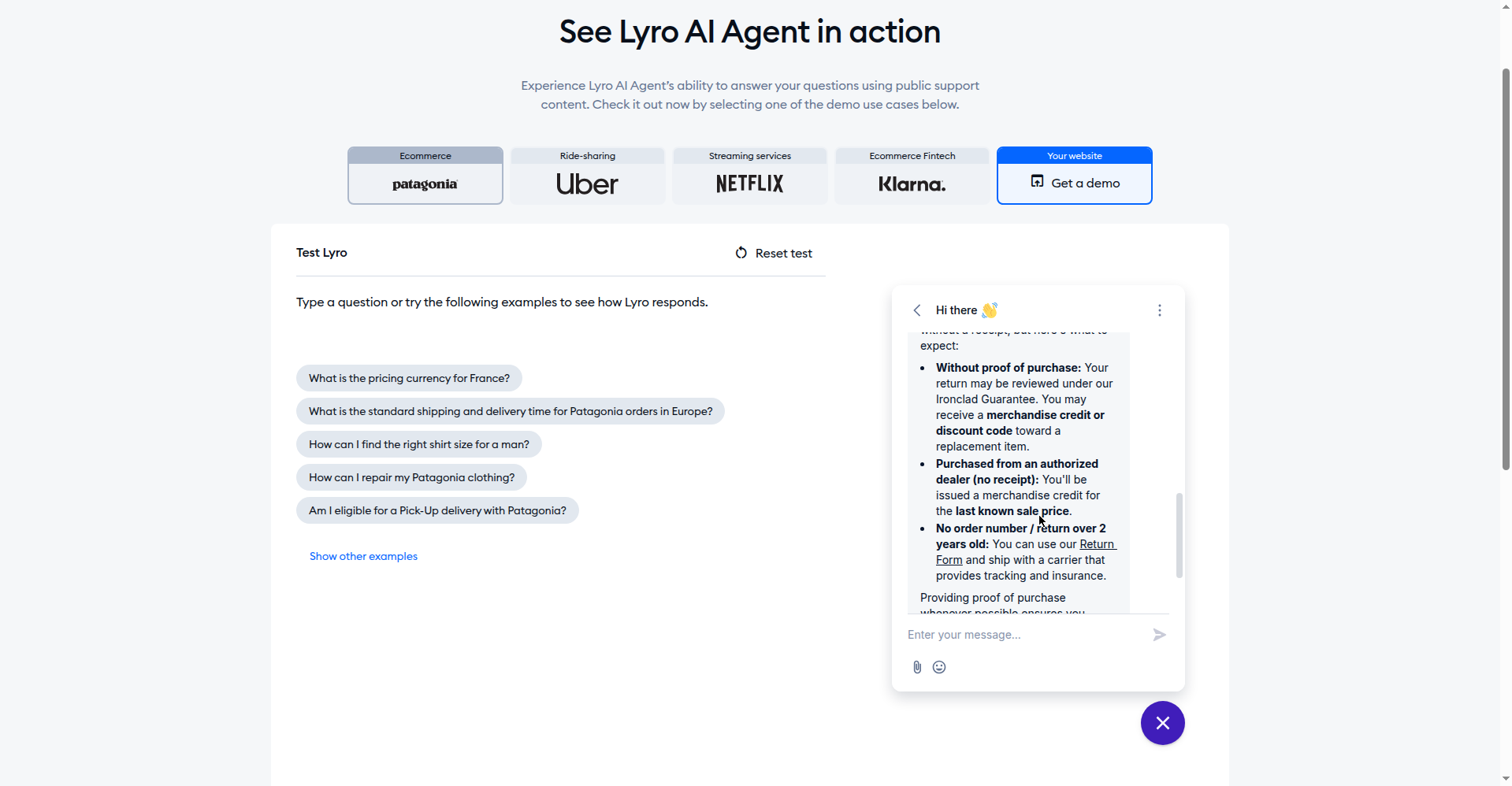
- We asked Tidio’s signup-free Lyro AI playground a real customer question — “Can I return a product without a receipt?” — and it answered in full, citing the store’s return policy specifics (screenshot in the Tidio section). Our first browser session crashed mid-test; the re-run completed it.
- We did not create paid accounts or submit signup forms, and invented nothing we didn’t see. Where a figure wasn’t on the vendor’s own pricing page (Zendesk’s per-resolution rate, ManyChat’s AI add-on), we say so.
- Verdicts are ours: price transparency, free-tier honesty, fit for a business with more work than staff. No tool paid for placement — the priciest got our harshest verdicts.
All 10 tools at a glance (prices verified October 13, 2026)
| Tool | Starting price | Free tier | AI cost model | Our verdict | Setup difficulty | Best channel fit |
|---|---|---|---|---|---|---|
| Tidio (Lyro) | $29/mo | Yes — 50 AI chats included | Separate Lyro quota from $39/mo | Worth it — best $0 start | Easy | Website, Shopify |
| Intercom (Fin) | $19/seat/mo (annual) | 14-day trial only | $0.99 per resolved conversation | Worth it at scale | Involved | Website, App |
| HubSpot (Breeze) | $7/seat/mo annual (Agent needs Pro $90) | Yes — chat, no AI agent | ~$0.50/resolved convo (reported) | Only if you’re on HubSpot | Medium | Website (HubSpot) |
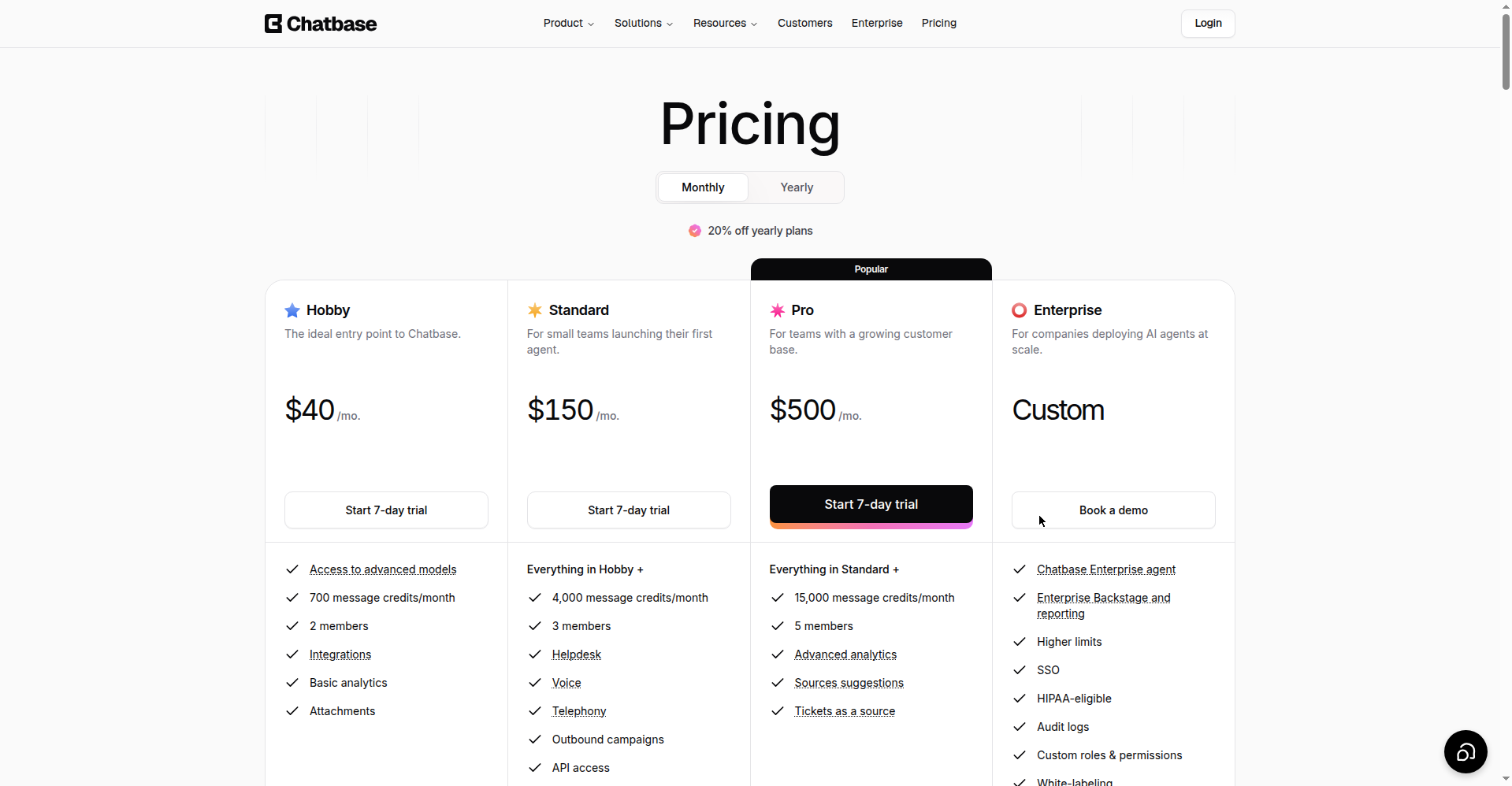
| Chatbase | $40/mo | 50 message credits/mo | Credit burn 1–6 per reply | Depends — watch credits | Easy | Website, WhatsApp |
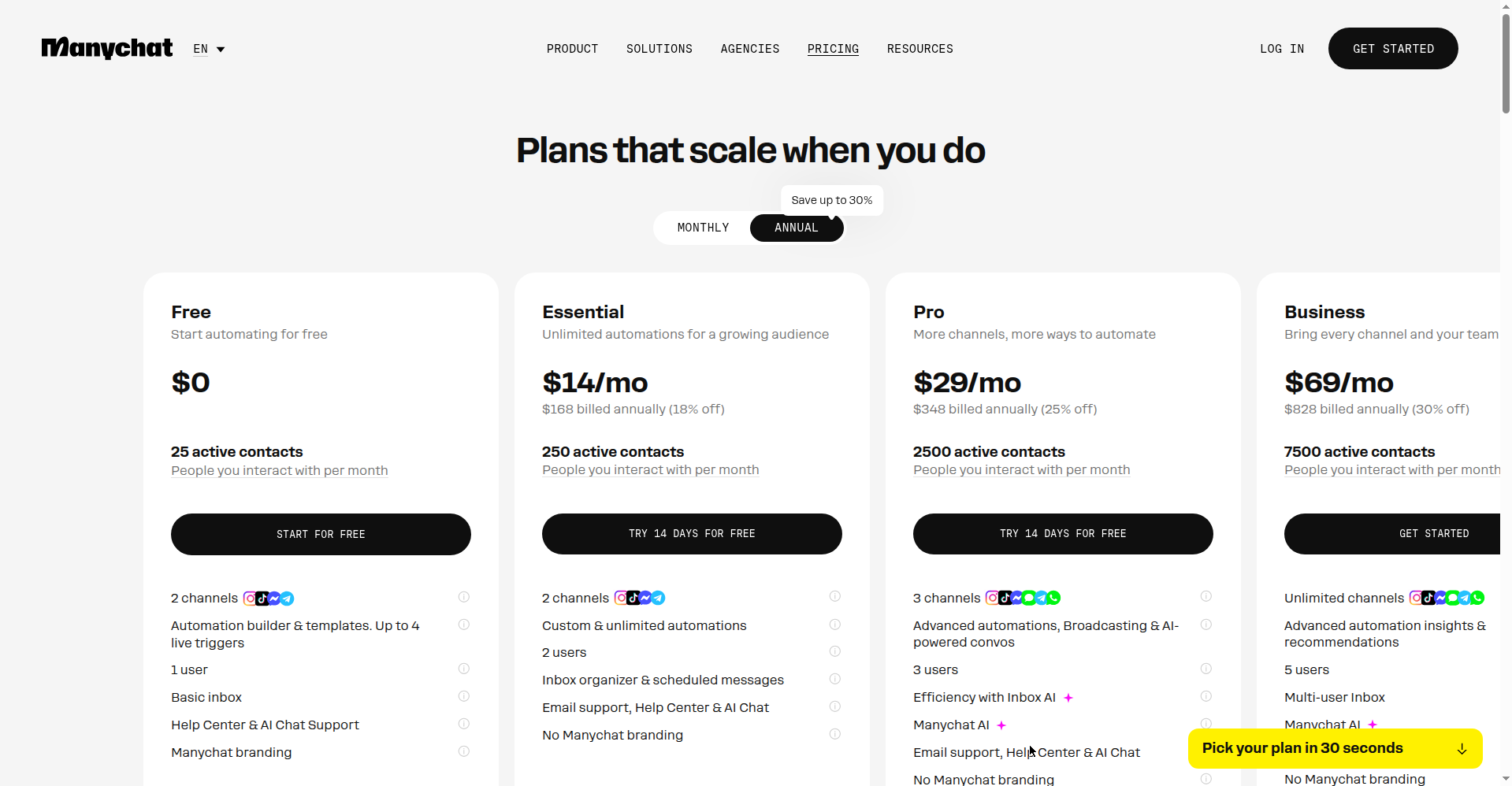
| ManyChat | $14/mo (annual) | 25 contacts | AI add-on ~$29/mo (unlisted) | Social-first only | Easy | Instagram, Messenger, WhatsApp |
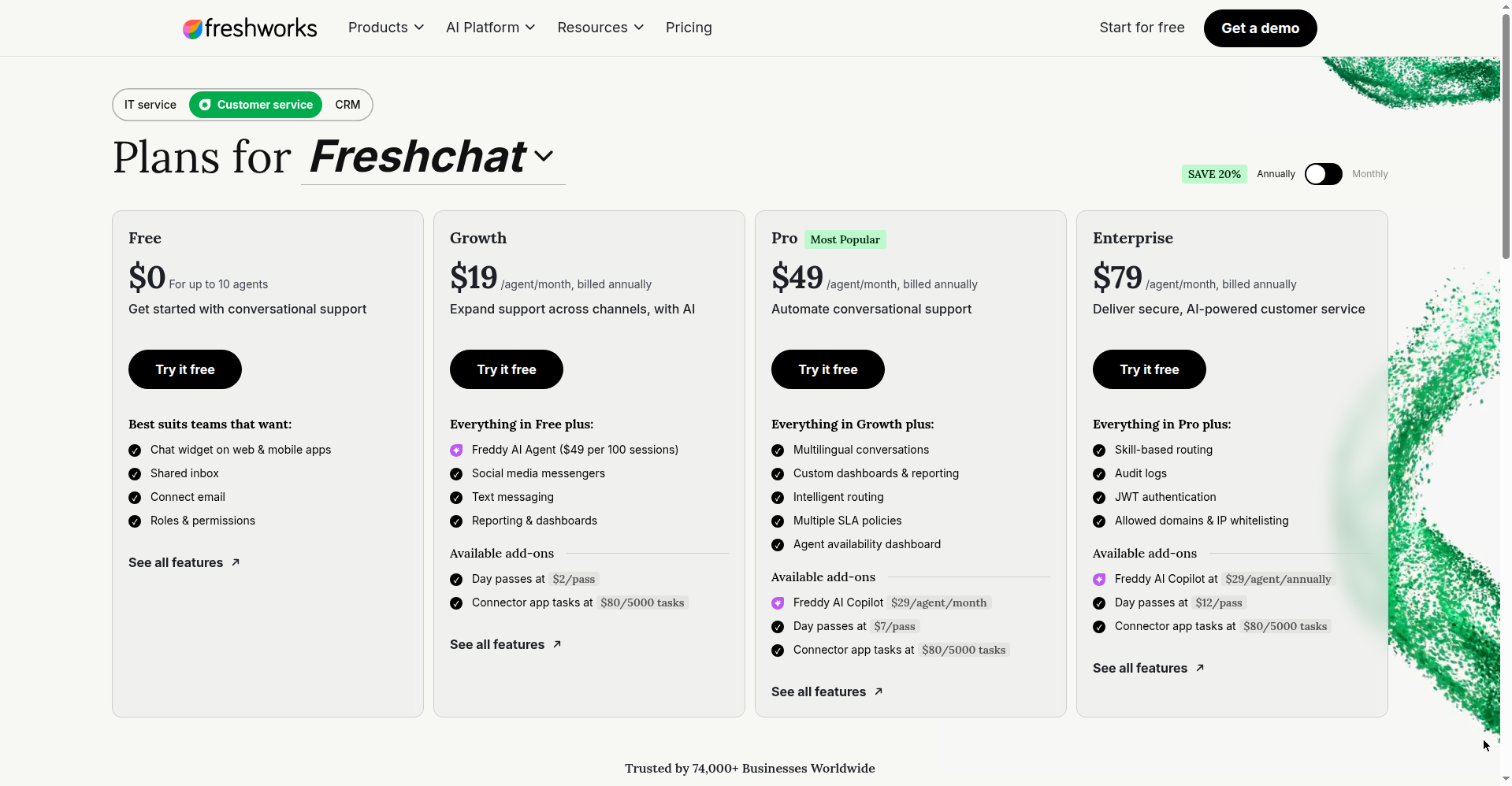
| Freshchat | $19/agent/mo (annual) | Yes — 10 agents, no AI | Freddy $49/100 AI sessions | Worth it under $50 | Medium | Website, WhatsApp, Messenger |
| Zendesk | $55/agent/mo annual (Suite) | 14-day trial only | Per Automated Resolution (rate unlisted) | Only if you’re on Zendesk | Involved | Website, Omnichannel |
| Crisp | $45/mo flat | Yes — chat, no AI credits | $5 AI credits (~90 convos) in Mini | Worth it — cheapest flat rate | Easy | Website, Shopify |
| Botpress | $150/mo annual (Plus) | 100 AI convos/mo | Bundled — no separate LLM bill | Worth it for builders | Involved | Website, Custom |
| Drift | — (brand retired) | — | — | Skip — it’s dead | — | — |
The 6 hidden costs nobody lists (we read the fine print)
This is the section that would have saved us the most money, so we’re putting it before the reviews. Every competitor lists the headline price. Almost none lists what the AI costs once you actually use it.
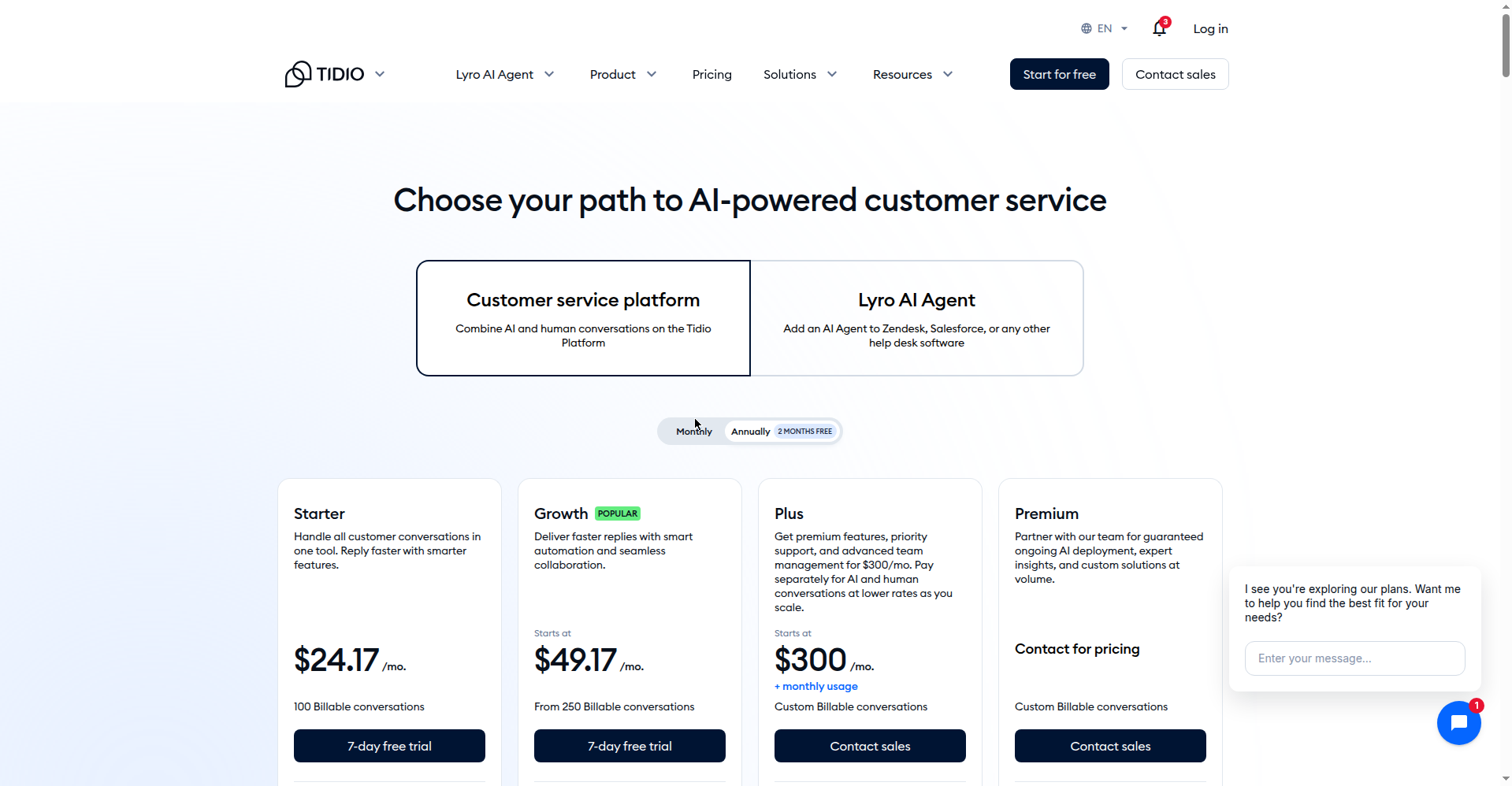
1. Tidio’s Lyro is a separate meter. The free tier’s 50 AI conversations are lifetime, not monthly — once they’re gone, real AI volume starts at $39/mo for 50 AI conversations a month, on top of your $29/mo Starter plan. Budget $68/mo, not $29, for AI answering daily questions.
2. Chatbase credits burn faster than the headline suggests. One reply costs 1–6 credits depending on the model, and using “actions” doubles the burn. The $40/mo Hobby plan’s 700 credits can evaporate in a busy week. Auto-recharge kicks in at $40 per 1,000 credits — set a spend alert on day one.
3. ManyChat’s free tier collapsed in 2026. It went from 1,000 to 25 active contacts — we verified this on their official pricing page today. Paid plans start at Essential $14/mo annual (250 contacts). And WhatsApp automations carry Meta’s own per-conversation fees on top of ManyChat’s price.
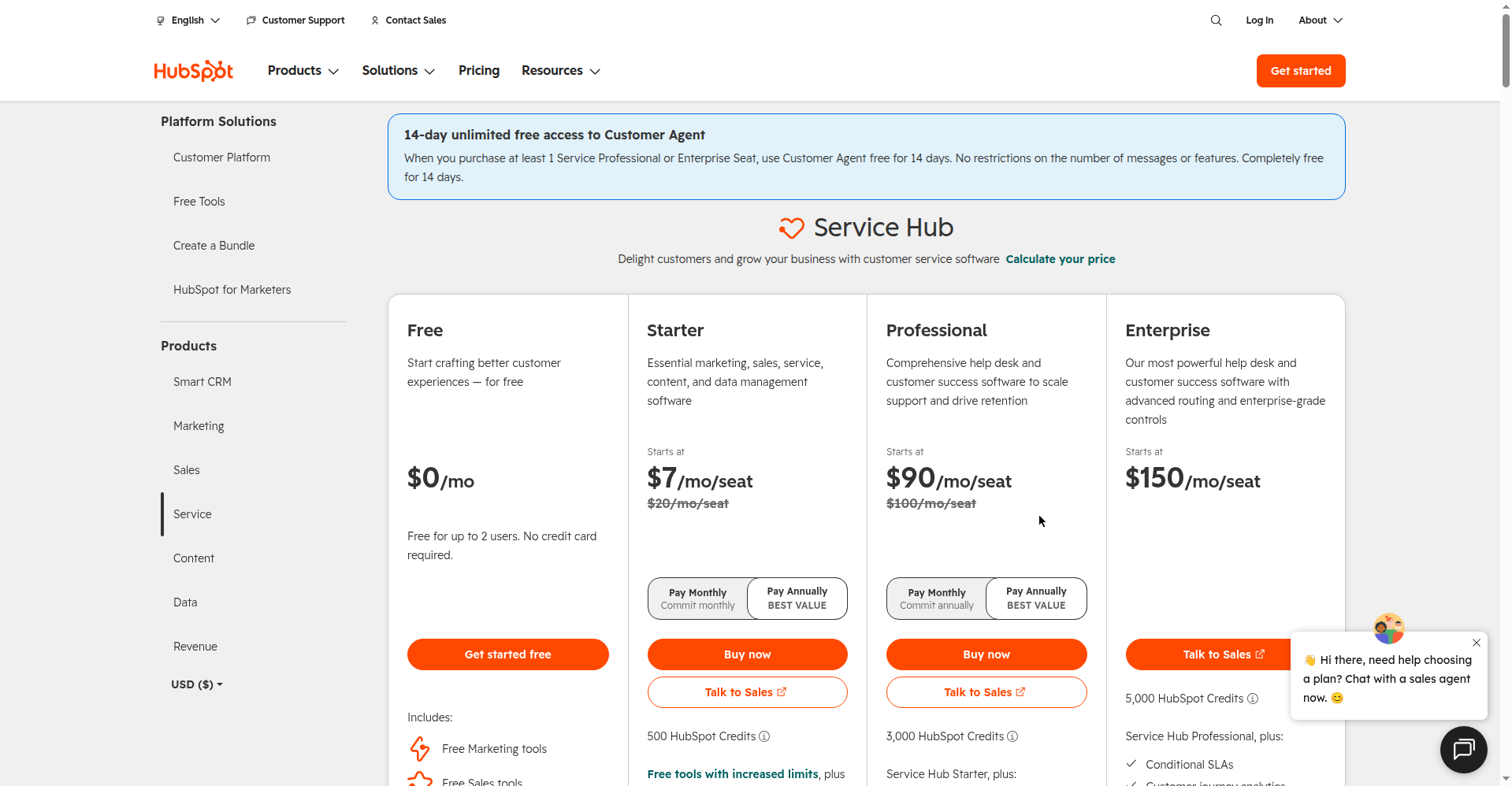
4. HubSpot’s AI agent has a velvet-rope entrance fee. The Breeze Customer Agent only exists on Pro ($90/seat/mo) and up, and Pro carries a mandatory $1,500 onboarding fee. Then roughly $0.50 per resolved conversation (widely reported; unconfirmed on HubSpot’s own page) — a $1,500+ commitment before your bot answers its first question.
5. Crisp’s old prices are wrong everywhere. Roundups still quote $7–30/seat. Crisp moved to flat workspace pricing: Mini is $45/mo for the whole workspace with unlimited conversations. Good news, actually — just don’t budget from a 2024 listicle.
6. Drift is dead. Salesloft’s own site says it “transitioned from Drift to 1mind,” and drift.com now redirects. Any 2026 roundup still ranking Drift as a buy is copy-pasting last year’s homework. We list it here only so you know to ignore those lists.
The 10 tools, reviewed honestly
1. Tidio — the best $0 start, but read the Lyro fine print
Verdict: Worth it. The only free tier here with genuine AI conversations included: 50 billable conversations a month, 10 seats, and 50 Lyro AI chats. The pricing page leads with a “Start for free” button and shows 7-day free trials on the paid plans, with no credit-card demand shown. The Shopify integration is the real deal for small stores: cart preview, order lookup, and refunds inside the chat. (We didn’t reach the signup form before our browser crashed, so we can’t confirm what it asks for.)
The catch: those 50 AI conversations are a lifetime allowance. Twenty chats a day burns through them in under a week; then Lyro becomes a separate $39+/mo stacked on your plan. Still the best free start we found.
Best for: small stores and services wanting AI answers this week for $0. Starting price: $29/mo Starter.
We asked Lyro a real question. On Tidio’s signup-free playground, we asked the demo bot — trained on a real store’s support content — “Can I return a product without a receipt?” It answered in full: Ironclad Guarantee review process, merchandise credit for dealer purchases without receipts, the return form for older orders. Grounded in the store’s actual policy, not generic filler. That’s the standard to hold every bot here to.
2. Intercom — the best bot money can buy, priced like it
Verdict: Worth it at scale; overkill under ~200 conversations a month.
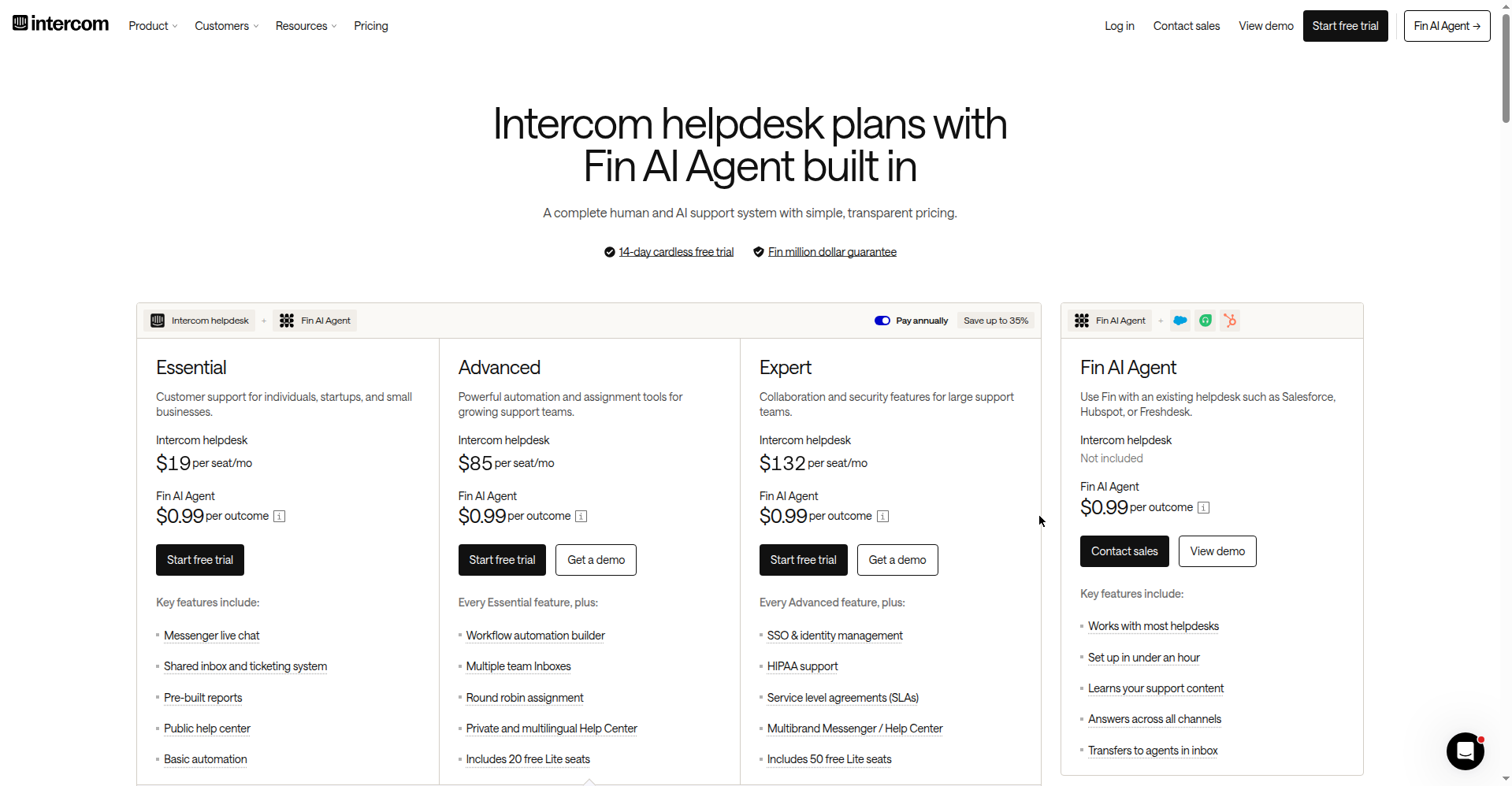
Fin is the most capable AI agent we looked at, with the most honest pricing: $0.99 per outcome — you pay when the customer confirms resolution, not when the bot escalates. No free plan (14-day trial); seats start at $19/seat/mo annual ($39 monthly). Fin now runs standalone on other helpdesks (Salesforce, HubSpot, Freshworks, Front, Zoho). Startups get up to 93% off plus a year of Fin free.
Best for: real chat volume where each resolution is worth more than a dollar. Price: $19/seat/mo annual + $0.99/resolved conversation.
3. HubSpot Breeze Customer Agent — great if you live in HubSpot; a trap if you don’t
Verdict: Only if you’re already on HubSpot.
Honest math: Service Hub’s free tier ($0, 2 users) includes live chat and ticketing — genuinely useful, no AI agent. The Breeze Customer Agent only unlocks on Pro at $90/seat/mo with a mandatory $1,500 onboarding fee, then roughly $0.50 per resolved conversation in HubSpot Credits (widely reported; unconfirmed on HubSpot’s own page). Powerful if your business already runs on HubSpot. If not, it’s a $1,500+ detour to get what Tidio gives away free — don’t buy a CRM to get a chatbot.
Best for: existing HubSpot Pro/Enterprise shops. Price: $7/seat/mo Starter; the AI agent needs Pro.
4. Chatbase — the simple “train on my website” bot, with a credit meter to watch
Verdict: Depends. Lovely product, spiky billing: point it at your website or upload docs, get a Q&A bot on web chat, WhatsApp, Messenger, Instagram, Slack, even phone. No per-seat billing. Hobby is $40/mo for 700 message credits — but one reply burns 1–6 credits by model, “actions” double the burn, auto-recharge is $40/1,000 credits. A busy week can quietly double your bill; set the spend alert on day one.
Best for: content-rich sites where the bot answers rather than transacts. Price: $40/mo Hobby.
5. ManyChat — the social-DM king, with 2026 asterisks
Verdict: Social-first businesses only.
ManyChat owns the Instagram-comment-to-DM and Messenger automation lane; nothing here touches it for social-first selling. We verified the 2026 pricing on their official page today: Free covers 25 active contacts across 2 channels; Essential is $14/mo annual (250 contacts); Pro is $29/mo annual (2,500 contacts) with AI-powered conversations. The catch: WhatsApp automations stack Meta’s own per-conversation fees on top of ManyChat’s price, and the AI add-on’s standalone price isn’t listed on the pricing page.
Best for: businesses that sell through Instagram, Messenger, or WhatsApp. Price: $14/mo annual (Essential).
6. Freshchat — the under-$50 team pick
Verdict: Worth it. The best value for a small team that needs real channels. Growth is $19/agent/mo annual with the messengers that matter — Facebook, Instagram, SMS, WhatsApp, Line, Google Business Messages. Free covers up to 10 agents (widget + inbox, no Freddy AI). Freddy AI Agent costs $49 per 100 sessions; Copilot is $29/agent/mo annual. A 3-person team runs ~$57/mo in seats plus AI usage — still the cheapest credible WhatsApp-capable setup here.
Best for: 2–10 person teams needing WhatsApp/Messenger plus the website widget. Price: $19/agent/mo Growth.
7. Zendesk — enterprise muscle, enterprise invoice
Verdict: Only if you’re already on Zendesk.
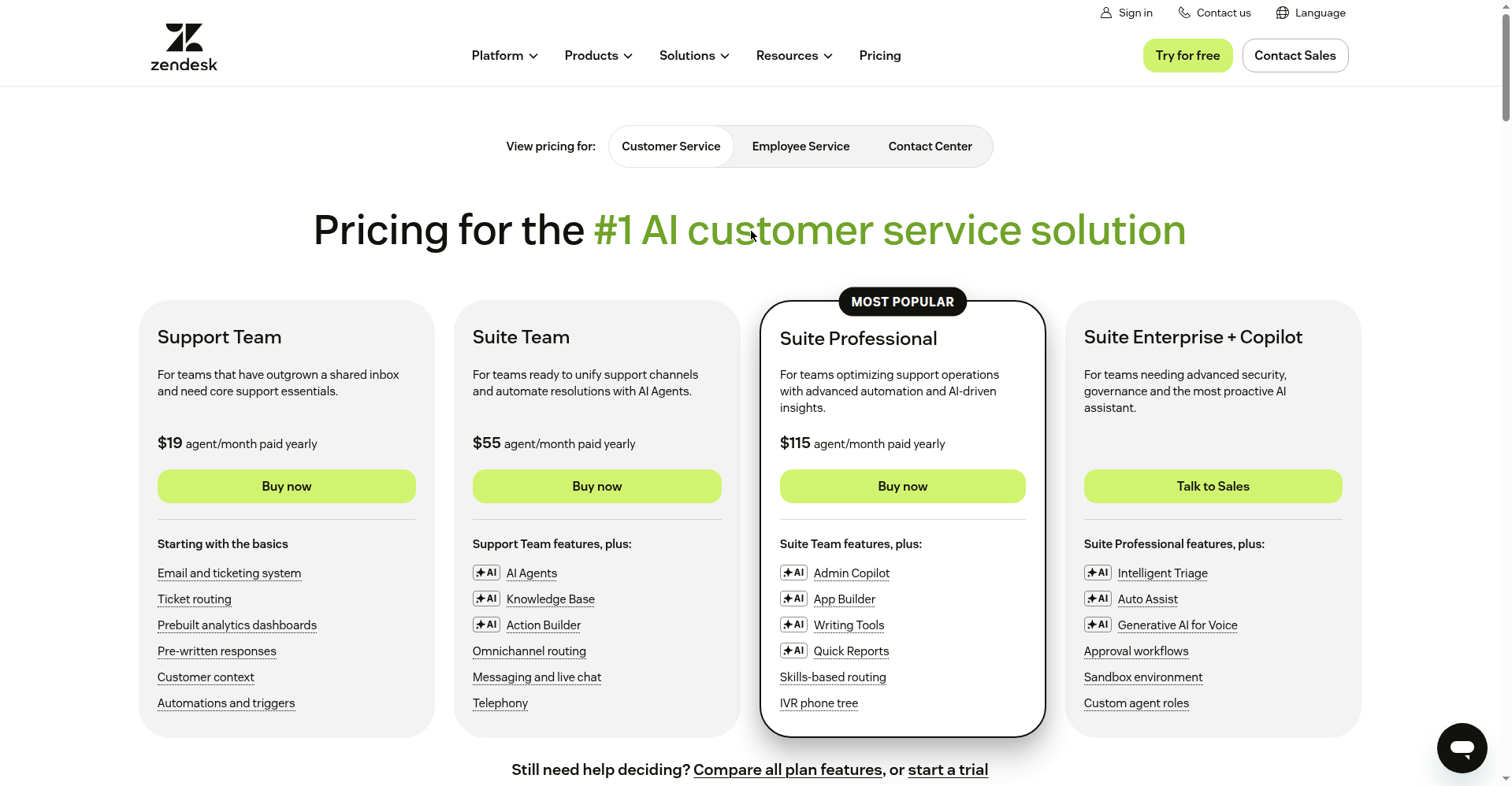
Genuinely good AI agents — no-code builder, KB-grounded answers, 80+ languages, every channel. Zendesk’s AI guide advertises “from $1.50 per automated resolution,” but its pricing page shows no per-resolution figure — AI is billed per “Automated Resolution” on top of seats, and full omnichannel starts at Suite Team $55/agent/mo annual. A 5-agent team pays $275/mo in seats before the AI meter starts — sensible add-on for existing Zendesk shops, a $3,000+/year answer to a $500/year question otherwise.
Best for: existing Zendesk shops scaling support volume. Price: $55/agent/mo Suite Team.
8. Crisp — the flat-rate sleeper pick
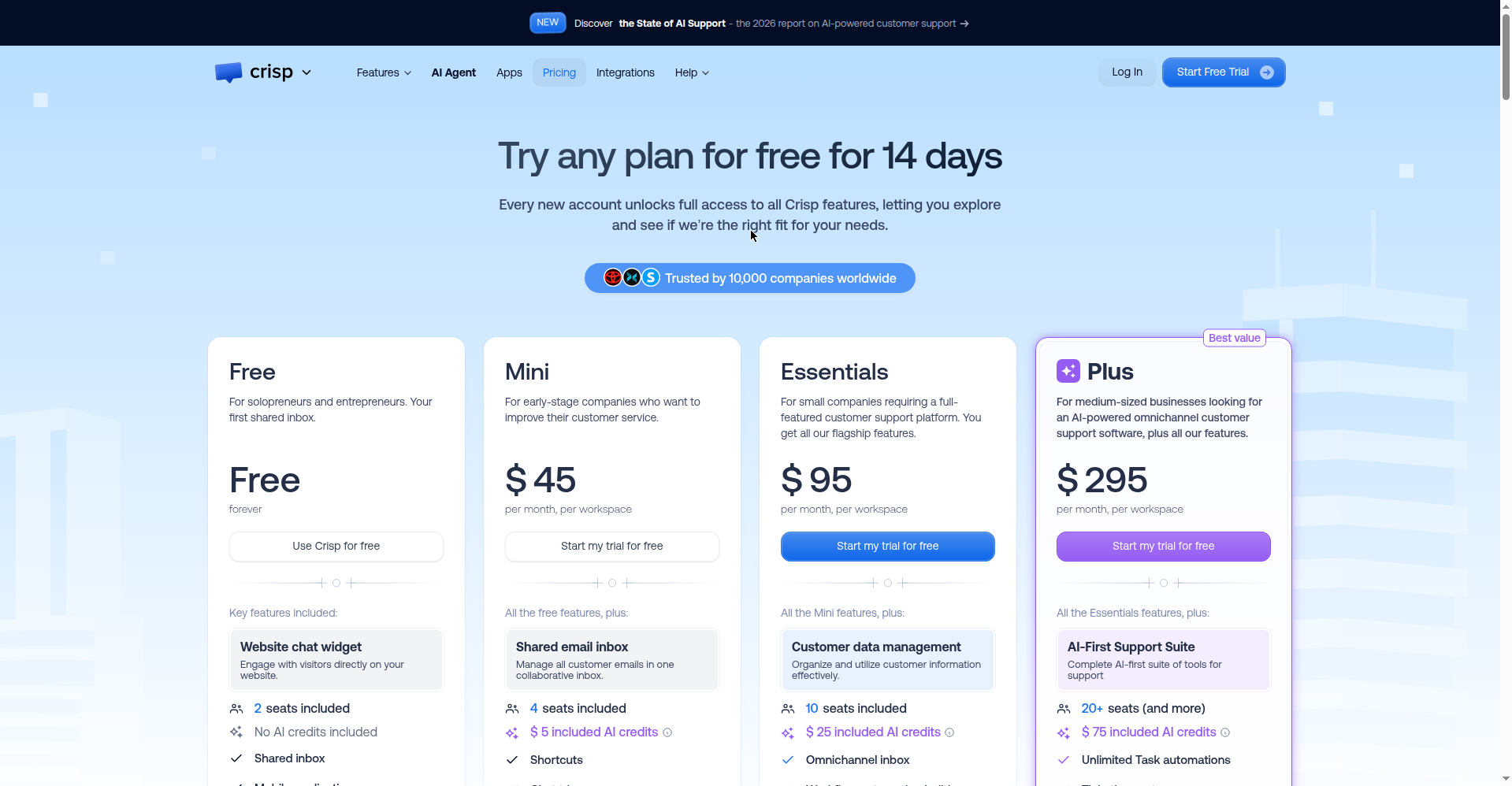
Verdict: Worth it. The simplest pricing in the roundup. Free is a real product: 2 seats, widget, shared inbox, contact form, native Shopify/WooCommerce/PrestaShop — $0, watermark on the widget. Mini is $45/mo flat per workspace: unlimited conversations, 4 seats, 5,000 profiles, $5 of AI credits (~90 automated conversations). No seat multiplication, no per-resolution meter. Essentials ($95/mo) adds WhatsApp Business, Instagram DMs, SMS, and the full AI chatbot.
Best for: stores and services wanting predictable billing on Shopify or WooCommerce. Price: $45/mo Mini (flat).
9. Botpress — the builder’s choice, with the fairest AI deal
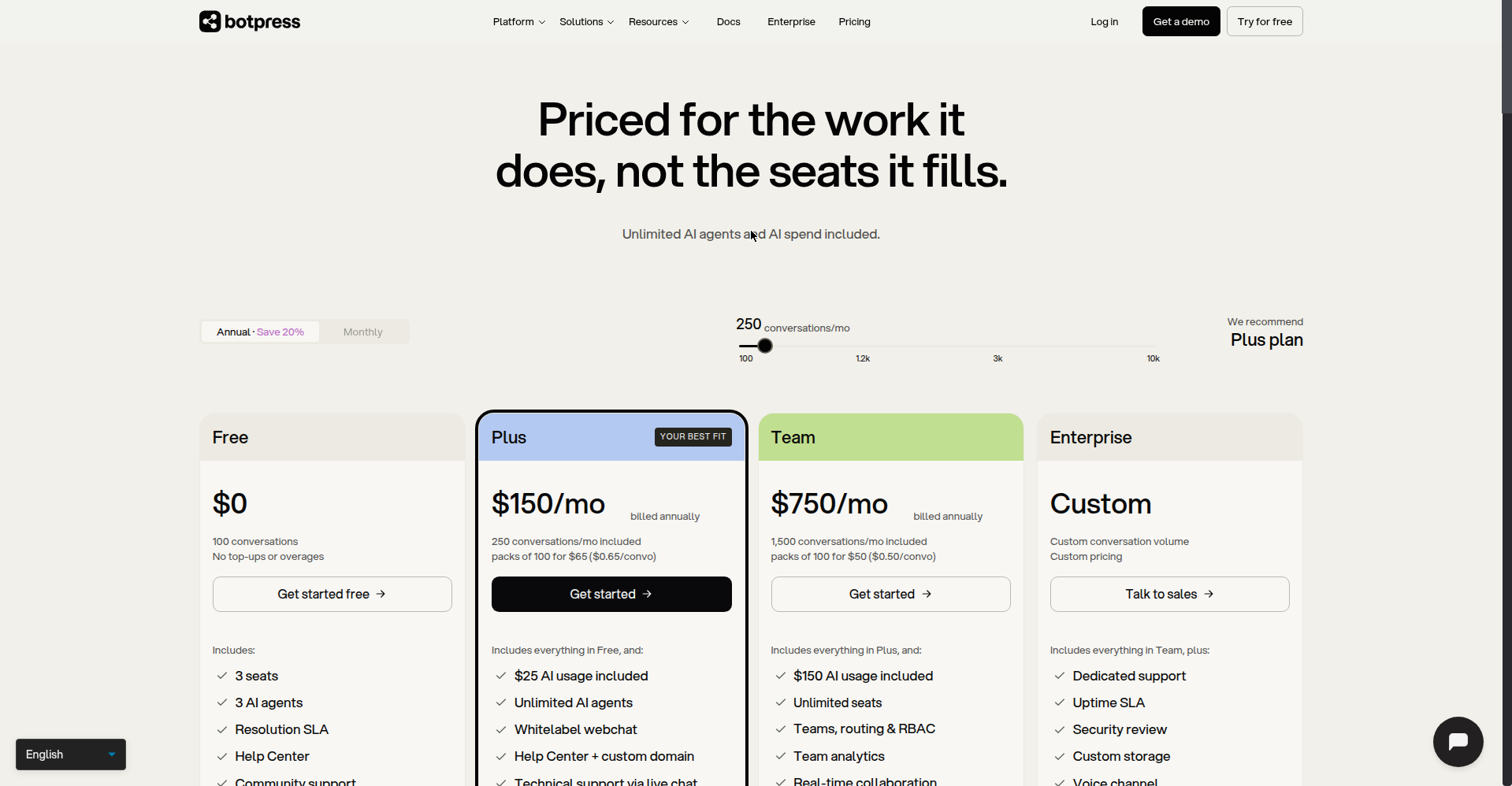
Verdict: Worth it for DIY types. 100 free AI conversations a month, 3 agents, 3 seats — and the line that sold us: “no separate LLM bill.” AI usage is bundled into every plan, so Chatbase/Tidio-style meter anxiety doesn’t exist. The visual flow builder is genuinely no-code-friendly, with 100+ language auto-translation and pre-built WhatsApp, Telegram, Messenger, Slack integrations. Plus is a steep $150/mo annual — prove the concept on free first.
Best for: owners comfortable building flows who want real AI without meter anxiety. Price: $150/mo Plus (free tier is generous).
10. Drift — skip it, it’s dead
Verdict: Skip. We’re including Drift only because half the 2026 roundups still rank it. Salesloft’s own website says it has “transitioned from Drift to 1mind,” and drift.com now redirects to Salesloft. There is no public SMB pricing because there is no product to buy. If a “best chatbots” list recommends Drift in 2026, that list is copy-pasting last year’s homework — discount everything else it says accordingly.
Pick by budget: the three stacks we’d actually buy
Three budget-based ways to choose the best AI chatbots for small business:
- $0/mo — prove it works first: Tidio Free (50 lifetime AI chats) + Crisp Free (shared inbox). Real AI, real inbox, $0. Upgrade when the AI allowance runs out.
- Under $50/mo — the small-team setup: Crisp Mini at $45/mo flat: unlimited conversations, no meter, no seat math. (Freshchat Growth at $19/agent/mo works too, but 3 agents lands at $57 — just over.)
- Scale — pay per resolution: Intercom Fin at $0.99/resolved conversation past ~200 chats a month. 500 resolutions costs $495, versus a $275 Zendesk seat bill plus $1.50 per resolution on top.
2-year cost box: what 200 conversations a month really costs
Monthly prices hide the real bill. Here’s two years at ~200 AI conversations a month (2,400 a year), using the verified prices above:
Tidio: Starter $29/mo + Lyro $39/mo = $68/mo → $816/year. Two years: ~$1,632. (The free tier’s 50 lifetime AI chats won’t survive 200/month.)
Intercom Fin: 2,400 × $0.99 = $2,376/year in resolutions, plus the $19/seat/mo base. Two years: ~$4,752 before seats. Worth it only when each resolved conversation is worth more than a dollar to you.
Crisp Mini: $45/mo flat → $540/year, unlimited conversations. Two years: ~$1,080. No per-resolution meter, no seat math — the cheapest predictable AI chatbot bill on this list.
What happens at 2am when the bot fails?
The question none of the top-4 ranking guides answer. Every bot fails sometimes — a weird question, a knowledge-base gap, an API hiccup. What happens next separates tools worth paying for from toys.
Demand three things before you buy: human handoff that carries the transcript (the conversation lands in a human inbox — not a dead “we’ll email you” form), fallback rules you control (“low confidence → offer a callback”), and offline capture (after hours, the widget becomes a contact form, not a wall). Tidio, Intercom, Freshchat, Crisp, and Zendesk all do transcript-carrying handoffs properly.
Set the expectation on your site: “Our assistant answers instantly; a human follows up within one business day.” An October 2026 study on AI “knowledge collapse” (via toolwise.ai) found chat tools surface a narrower slice of information than search — which is exactly why training your bot on your content, and routing edge cases to a human, isn’t optional polish. It’s the product.
When NOT to use a chatbot
Straight talk: a chatbot is the wrong answer more often than vendors admit. Skip it if your volume is under ~20 chats a month (fast email beats a bot nobody talks to), if your sales need real persuasion (high-ticket services, custom quotes — the bot becomes a gatekeeper that costs you deals), or if you won’t maintain the knowledge base (a bot trained on last year’s prices confidently lies to customers — worse than no bot).
The honest test: if you can’t name the 10 questions customers ask most, you’re not ready for AI — you’re ready for a FAQ page. Write the FAQ first. Automate second.
Once two people touch support or messages arrive on multiple channels, the question stops being chatbot-or-nothing — our AI helpdesk software guide tests 10 tools on real tickets, so you can compare a shared inbox against the bots above.
WordPress and Shopify: 30-second integration notes
WordPress: Tidio, Crisp, and Chatbase ship official plugins — install, paste the key, done. Intercom and Zendesk use a code snippet or WP integration; plan 15 minutes and a staging check. Shopify: Tidio and Crisp have native apps with order lookup inside the chat (“where’s my order?” gets a real answer). Freshchat and Chatbase connect through the app store. On WooCommerce, Crisp’s native integration is the smoothest we saw.
Setup checklist: make your chatbot actually work
Most chatbots fail not because the AI is bad, but because the setup is lazy. Run through this before you call it done:
1. Define the bot’s ONE job. A chatbot that tries to do everything does nothing well. Pick the single task that eats your time: answering “where’s my order?”, booking appointments, qualifying leads. Write it down. If a feature doesn’t serve that job, turn it off.
2. Build the knowledge base from your real content. Point the bot at your actual FAQ page, shipping policy, pricing page, and top 10 support articles — not a blank slate. Delete anything outdated first. A bot trained on last year’s return policy will confidently lie to customers, and that’s worse than no bot.
3. Rewrite the tone in your brand voice. Default bot copy sounds like a bank. Open the greeting, fallback, and handoff messages and rewrite them how you’d actually talk. “Hi! I’m the shop assistant — ask me about orders, shipping, or returns” beats “Welcome. How may I assist you today?” Read them out loud; if you cringe, rewrite.
4. Set up human handoff that carries the transcript — plus a fallback. When the bot can’t answer, the full conversation must land in a human inbox, not a dead “we’ll email you” form. Configure: “If confidence is low or the customer asks twice, offer a callback or live agent.” Test it at midnight — if you can’t reach a human, your customers can’t either.
5. Review transcripts weekly for the first month. Block 30 minutes every Friday. Read 20 random conversations. You’ll find questions the bot got wrong (fix the knowledge base), questions it never saw (add them), and tone-deaf replies (rewrite). After a month, you’ll have a bot that works. Most owners skip this and wonder why customers hate the bot.
FAQ: best AI chatbots for small business
What is the best AI chatbot for small business? Tidio for a $0 start, Crisp Mini ($45/mo flat) for predictable pricing, or Intercom’s Fin ($0.99/resolved conversation) past ~200 chats a month. Match the pricing model to your volume.
How much does an AI chatbot cost for a small business? $0 to start — Tidio, Crisp, and Botpress all have genuinely usable free tiers. Most small businesses land between $29 and $95 a month. Watch the AI meters, though: per-resolution and credit billing can double the headline price.
Are AI chatbots worth it for a one-person business? Only if chat volume steals real hours. Under ~20 conversations a month, fast email replies beat a bot. Past that — especially after-hours questions from other time zones — a $0–45/mo bot pays for itself the first time it answers a midnight pricing question that would otherwise have bounced.
Will an AI chatbot work with my Shopify or WordPress site? Yes. Tidio, Crisp, and Chatbase have official WordPress plugins; Tidio and Crisp have native Shopify apps with order lookup inside the chat. Intercom, Zendesk, and Freshchat connect via snippet or app-store integration.
What happens when the chatbot can’t answer? A good setup hands the full transcript to a human inbox with fallback rules you control (“low confidence → offer callback”). After hours, the widget should become a contact form, not a dead end. Test this before launch — it’s the difference between a tool and a toy.
Do customers trust AI chatbot answers? For factual questions (hours, prices, policies), yes — if the answers are right. That’s the catch: an October 2026 study found AI chat tools surface narrower information than search, so a bot trained on stale content confidently misleads. Keep the knowledge base current; route edge cases to humans.
Can a chatbot replace human customer service? No. Chatbots handle repetitive factual questions — hours, shipping, returns. Humans handle angry customers, complex issues, and sales that need persuasion. The best setup is bot for the boring stuff, human for the hard stuff. If you fire your support team and keep only a bot, customers will notice.
How long does setup actually take? A basic bot (FAQ + greeting) takes an afternoon. A good bot — trained knowledge base, brand voice, handoff rules, tested fallback — takes 1-2 weeks of part-time work. The transcript review in month one is where it actually gets good. Budget more time for the knowledge base than for clicking through the tool’s settings.
Is my chatbot GDPR/privacy compliant? Depends on your provider and your setup. Chat transcripts can contain personal data: names, emails, order numbers. Check your provider’s data-processing agreement, where the servers sit, and how long transcripts are retained. Add a privacy notice inside the chat widget. If you serve EU customers, this isn’t optional.
Can I run chatbots on multiple platforms at once? Yes, but pick a tool built for it. ManyChat runs Instagram, Messenger, and WhatsApp natively. Freshchat covers WhatsApp, Messenger, and website. Tidio and Crisp are website-first with some integrations. Running a separate bot per platform doubles your maintenance — use one tool that covers the channels where your customers actually are.
The bottom line
Start free — Tidio’s AI allowance or Crisp’s free inbox — and spend only when volume forces you to. Pay for the bottleneck, not the priciest bot on the list. Treat any vendor that hides its pricing, or any roundup still recommending Drift, as disqualified. That’s our honest take on the best AI chatbots for small business in 2026.
We’re the ToolsBizAI Team — we check AI tools against real small-business budgets so you don’t learn the expensive way. More about us.
Enjoying ToolsBizAI guides?
Add us as a Preferred Source on Google — you'll see our latest tools and guides first in Search, Top Stories, and AI Overviews.
Get One Useful AI Tool Tip Every Week
One practical AI tool tip in your inbox every week. No spam, unsubscribe anytime.

We’re the team behind ToolsBizAI. We hands-on test AI tools for small businesses — signing up for free plans, taking real screenshots, and fact-checking every claim before publishing. Our guides cover marketing, customer support, and day-to-day operations.