

The best AI SEO tools for small business in 2026 fit a tight budget and a one-person workflow: start free with Google Search Console and Rank Math, add one paid suite only when you can name its job, and track AI search mentions. I compared eight tools — prices verified 14 November 2026 — and three are worth paying for.
In this guide you’ll find: the eight tools I compared (Semrush, SE Ranking, Ahrefs, Surfer, Frase, BrightLocal, Rank Math, and Google Search Console), a verified pricing table, what each tool does on real small-business SEO jobs, a local-SEO workflow for the map pack, how to track AI Overview and ChatGPT mentions, and what I’d buy at $0, $50, and $150 a month.
TL;DR: no budget? Search Console plus Rank Math free covers the basics. About $50 a month? Frase Starter ($39/mo annual) — or BrightLocal Track ($31/mo annual) if you’re local. Semrush ($139/mo) is the best tool here — and the hardest to justify under $10K a month in revenue.
How we tested
I did not run card-walled free trials, and I did not feed the same brief through all eight tools — so no side-by-side output scores and no claims pretending otherwise. I opened each tool’s official pricing and product pages and cross-checked every price against two independent checks dated October or November 2026. Prices are US dollars as listed in November 2026 — confirm at checkout.
The 8 tools, head to head
No tool here does all five jobs well at a small-business price — match the tool to your job.
| Tool | Entry price (annual) | Free tier | Best for | Biggest catch |
|---|---|---|---|---|
| Semrush | $117.33/mo | Limited free account | All-in-one suite | AI visibility extra |
| SE Ranking | $103.20/mo | 14-day trial, no card | Best-value all-in-one | Local tools cost extra |
| Ahrefs | $129/mo Lite | Webmaster Tools free | Backlinks, competitor research | Credits meter everything |
| Surfer | $49/mo | 7-day trial only | Draft optimization | No AI tracking on entry plan |
| Frase | $39/mo | 7-day trial, no card | Briefs and drafts | 10 articles a month |
| BrightLocal | $31/mo | 14-day trial, no card | Local SEO | Reviews need $65/mo tier |
| Rank Math | $0 free; Pro $95.88/yr | Free plugin | On-page SEO in WordPress | AI costs extra |
| Google Search Console | $0, always | Free | True traffic data | Says what happened, not what to do |
1. Semrush — the best all-in-one, and the priciest verdict here
Verdict: worth it if SEO is a weekly job; skip it if you publish twice a month.
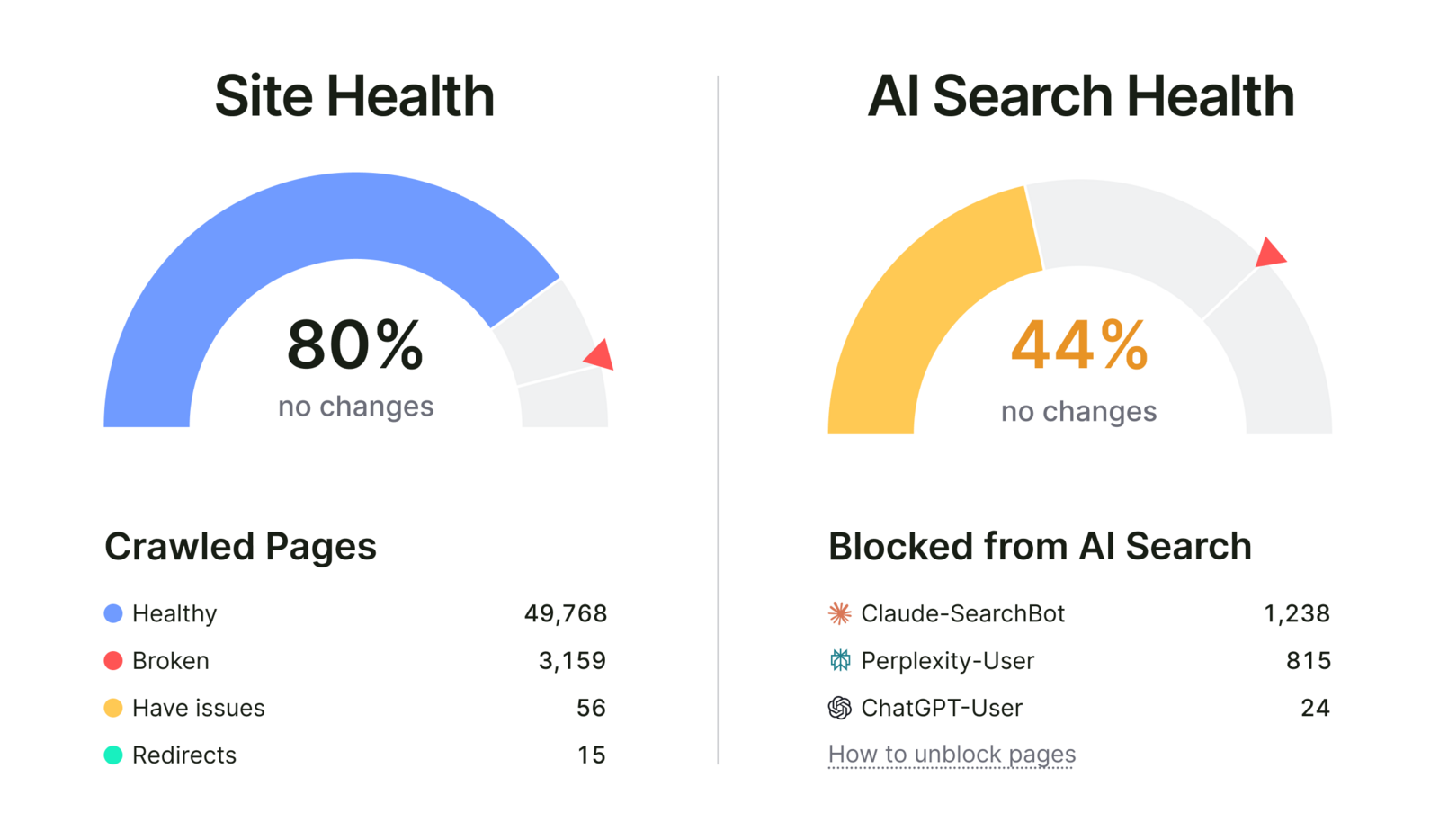
Semrush is the benchmark here, and it earns that. One login covers research, audits, rank tracking, backlinks, and competitor gaps. The audit grades site health and scores AI Search Health next to it. A site can score 80% on Site Health and 44% on AI Search Health at once: AI health is whether ChatGPT, Perplexity, and Claude can reach your content, and Semrush’s panel shows Claude-SearchBot blocked from 1,238 pages. If an AI bot can’t crawl you, you can’t be cited.
Entry is $139 a month ($117.33 prepaid for the year), one seat, AI visibility extra. Buy it if Google already brings you leads. Skip it if you haven’t published in a month — buy SE Ranking instead.
2. SE Ranking — the best-value suite, my pick for most small businesses
Verdict: worth it. The cheapest full suite here — and the clearest dashboard of the big tools.
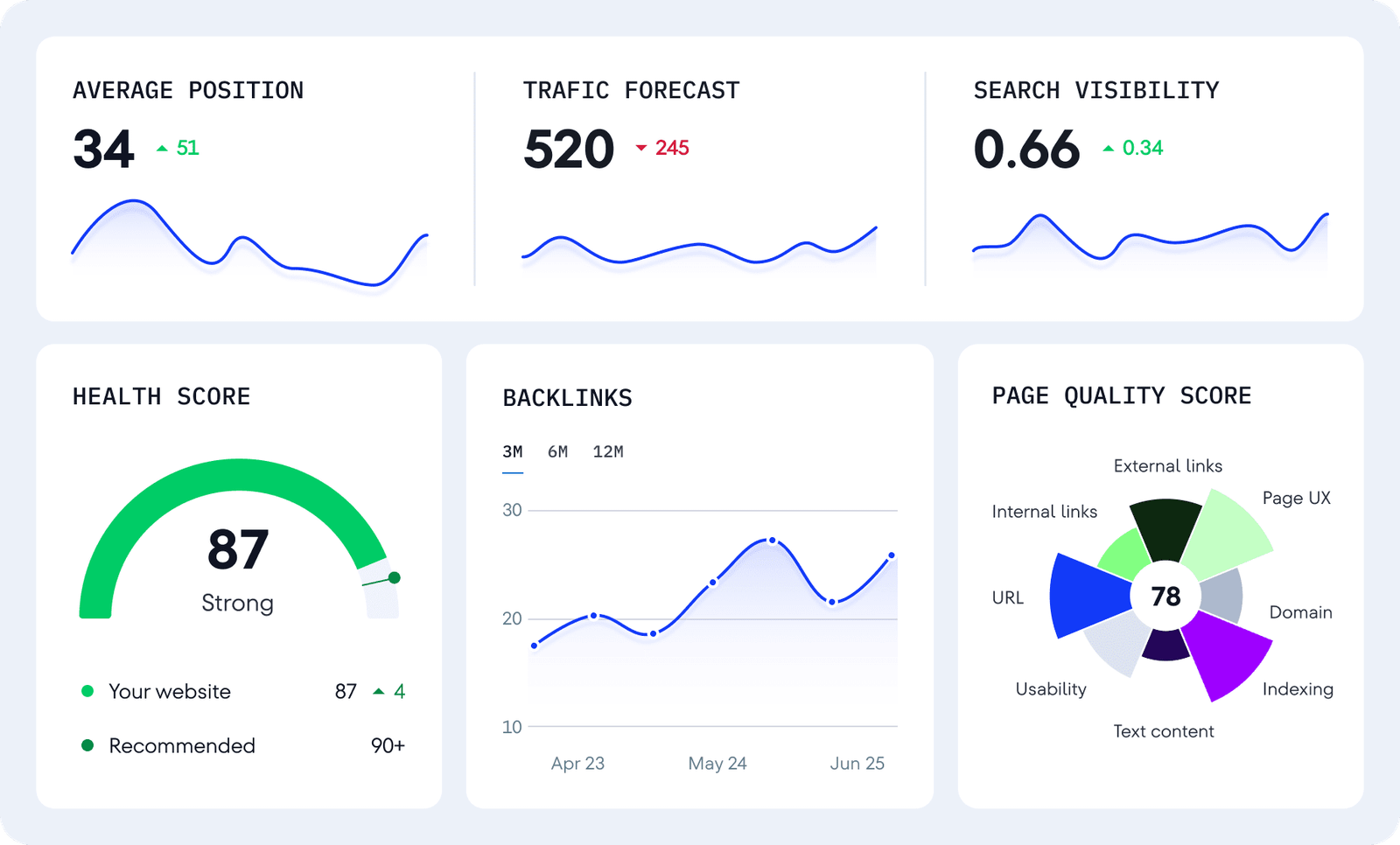
SE Ranking does about 80% of what Semrush does for $103.20 a month annual ($129 month-to-month). Core covers 2,000 tracked keywords, 10 projects, audits, keyword research, and backlink checks. Its dashboard is the clearest of the big suites: average position, traffic forecast, health score, and a page-quality wheel. Note: older guides still quote the retired $52 Essential plan — SE Ranking restructured its plans in late 2026, and Core at $103.20 a month annual is the current entry price.
Two caveats: local SEO tools cost extra as an add-on, so a local business pays more than the base plan — check the add-on price on the pricing page before you buy; and the 14-day trial needs no card — start it on a weekend. Buy it if you want one paid SEO tool. Skip it only if your whole job is writing — then Frase is the better spend.
3. Ahrefs — the backlink king, priced like one
Verdict: worth it for one job — seeing who links to you and your competitors. Skip it as a general SEO tool.
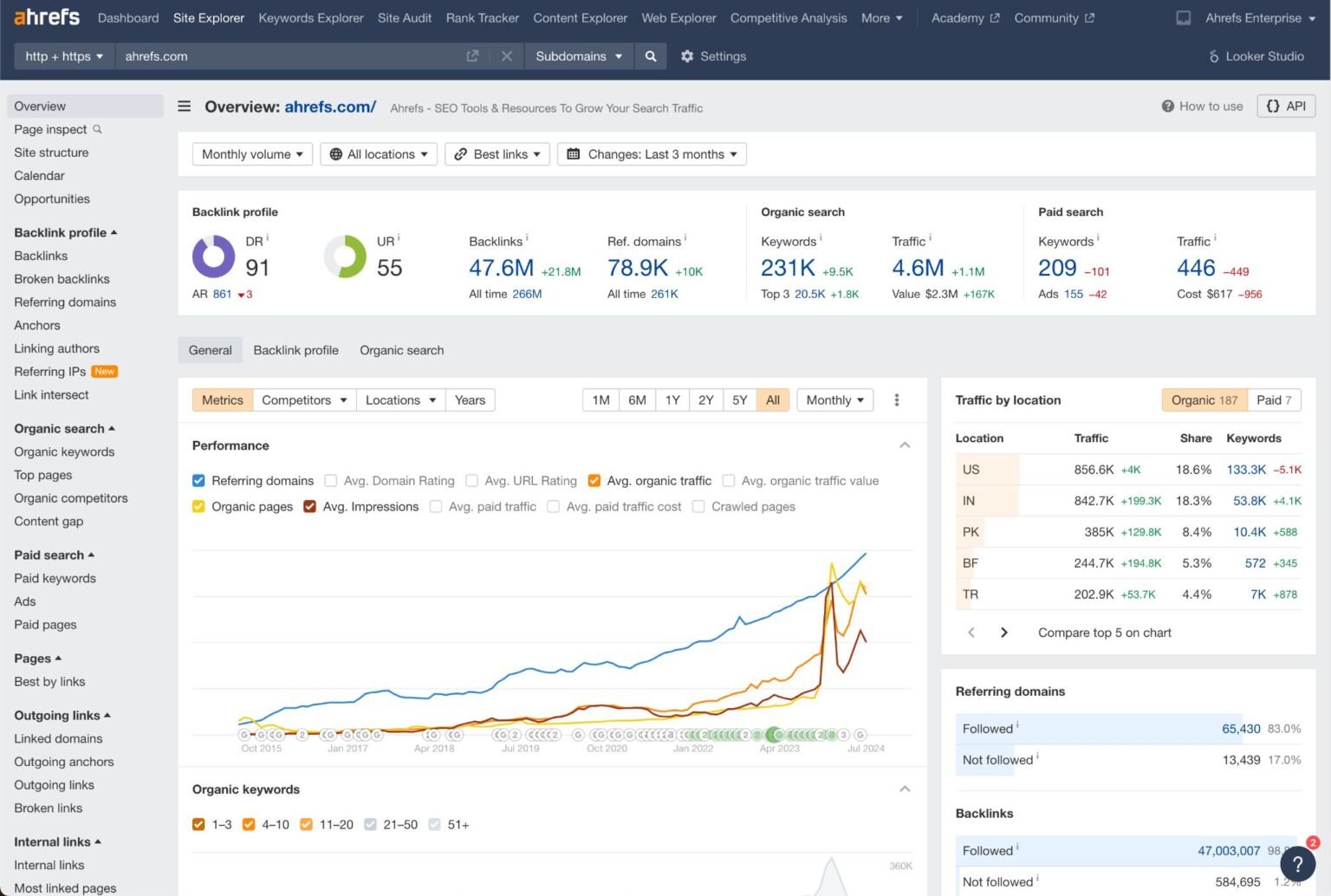
Ahrefs has the deepest backlink data here. Type a competitor’s domain into Site Explorer and you see Domain Rating, backlinks, top pages, and the keywords they rank for — the best competitor view in the category.
But the pricing works against a small business. The $29 Starter plan looks cheap until you read the limits: 200 credits a month, one gone per report or filter. The real starting point is Lite at $129 a month ($107.50 annual) — no free trial. Webmaster Tools is free for sites you own, and excellent for audits and backlink checks. Buy it for a competitor teardown once a quarter. Skip it if you just need keyword ideas and an audit.
4. Surfer — the editor that grades your draft against Google’s top 10
Verdict: worth it if you already write every week; skip it if you don’t.
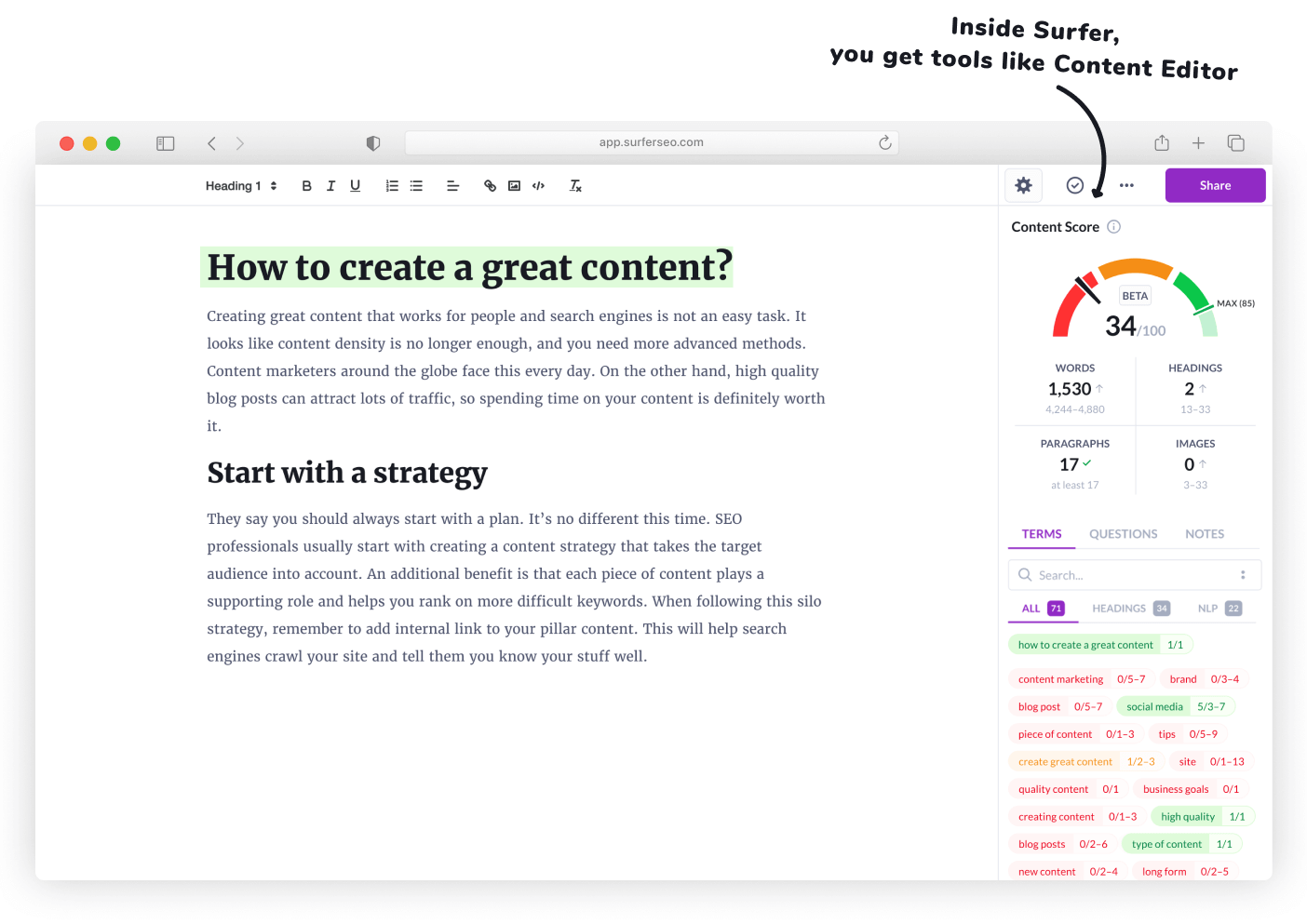
Surfer reads the pages already ranking for your keyword, then scores your draft against them in real time — word count, headings, terms to include, terms you’re missing. The score updates as you type.
Discovery is $49 a month annual ($59 month-to-month) for 120 documents a year, but it includes no AI prompt tracking — that starts on Standard at $99 a month annual. It has no keyword database and no crawler, so it can’t replace a research tool. Buy it if you publish at least twice a month. Skip it if you’re still figuring out what to write — start with SE Ranking, add Surfer later.
5. Frase — the cheapest real content-SEO workflow
Verdict: worth it. The best $39 a month in this guide if writing is your bottleneck.
Frase rebuilt itself in 2026 around one workflow: research a topic, build a brief from what’s ranking, draft with AI help, optimize against the same SERP — and track whether AI search cites you. The Rank-Ready flow walks you through it in six steps. The topics step is the part I liked most: pick the relevant topics and the AI weaves them in, so the draft comes out structured instead of rambling.
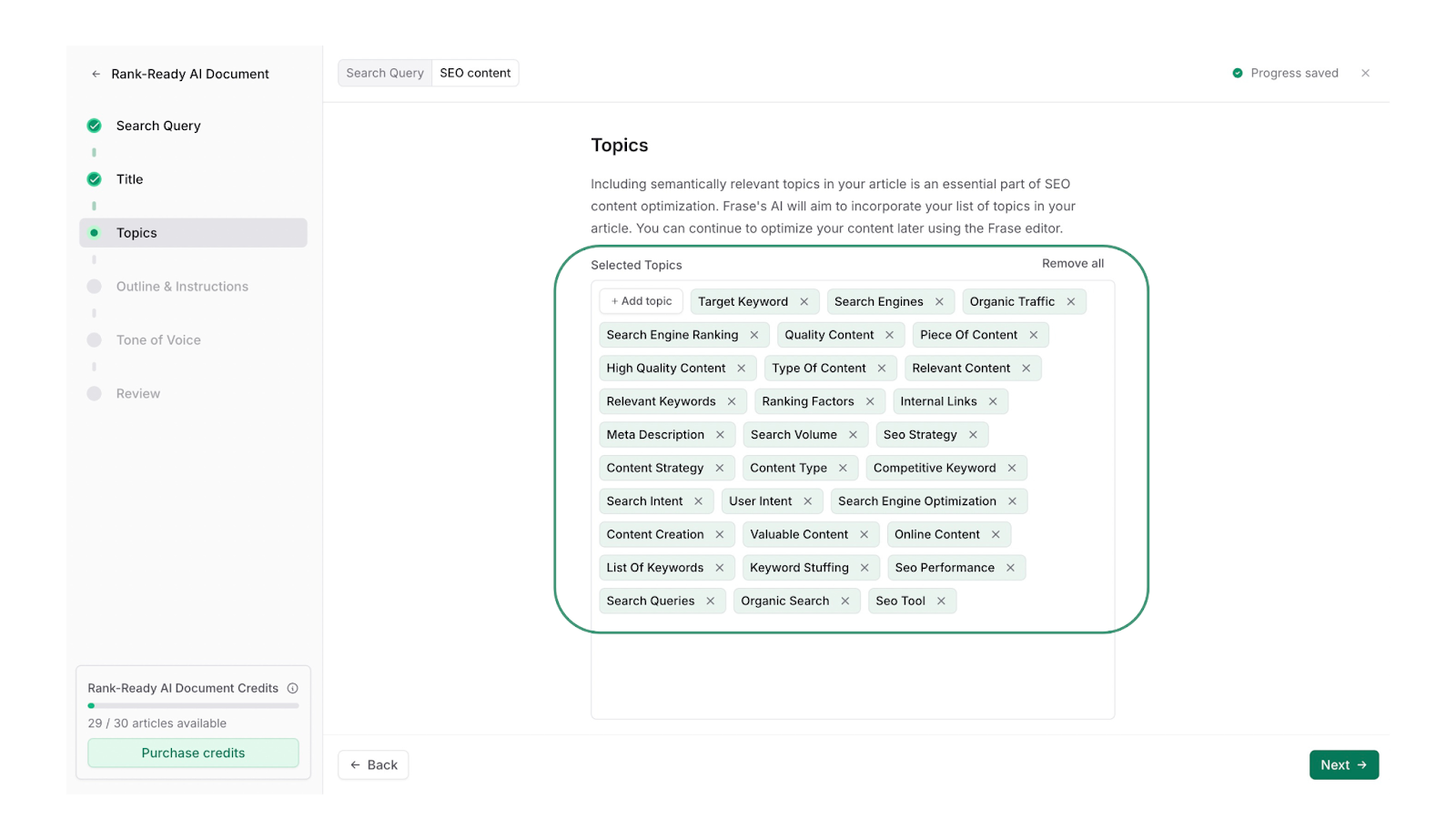
Starter is $39 a month annual ($49 month-to-month): one seat, one site, 10 articles and 20 AI Visibility prompts a month. The 7-day trial needs no card; there is no free plan, so use it on a real article. Buy it if you need help going from “what should I write” to a published, optimized post. Skip it if you need rank tracking or audits — pair it with Search Console, which is free.
6. BrightLocal — the only tool here built for the map pack
Verdict: worth it for any business with a physical location or a service area. Skip it if all your customers find you online.
For a local business, the map pack matters more than the blue links. When someone searches “plumber near me,” Google shows three businesses on a map before ten websites. BrightLocal’s Local Search Grid shows you, block by block, where you rank — green pins where you’re top three, red where you’re invisible.
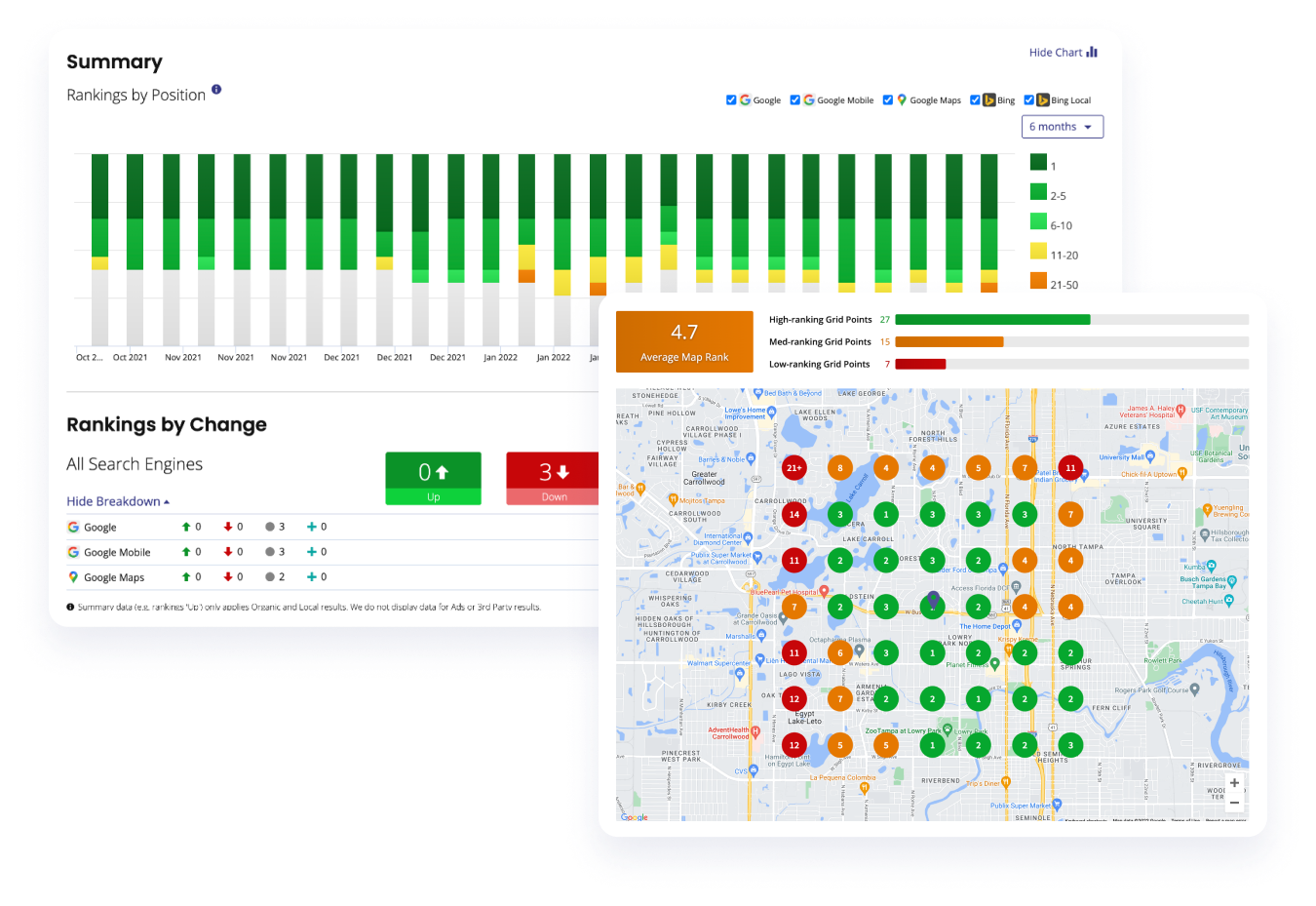
Pricing is per location, users unlimited. Track is $41 a month ($31 annual) for one location: rank tracking, the grid, a GBP audit, citation tracking. But review management lives only on Grow at $65 a month ($49 annual) — if reviews are why you’re buying, your real entry price is $65. The local workflow: fix your Google Business Profile first, check the grid weekly, and ask every happy customer for a review the same day. Buy it if you’re local. Skip it if you’re online-only.
7. Rank Math — the on-page layer every WordPress site already needs
Verdict: worth it, and the free version is the best $0 in this guide.
If your site runs on WordPress, Rank Math handles the on-page basics: titles, meta descriptions, sitemaps, schema markup, and the checks that tell you whether a post is optimized before you publish. The Modules screen lets you switch on exactly what you need — nothing more.
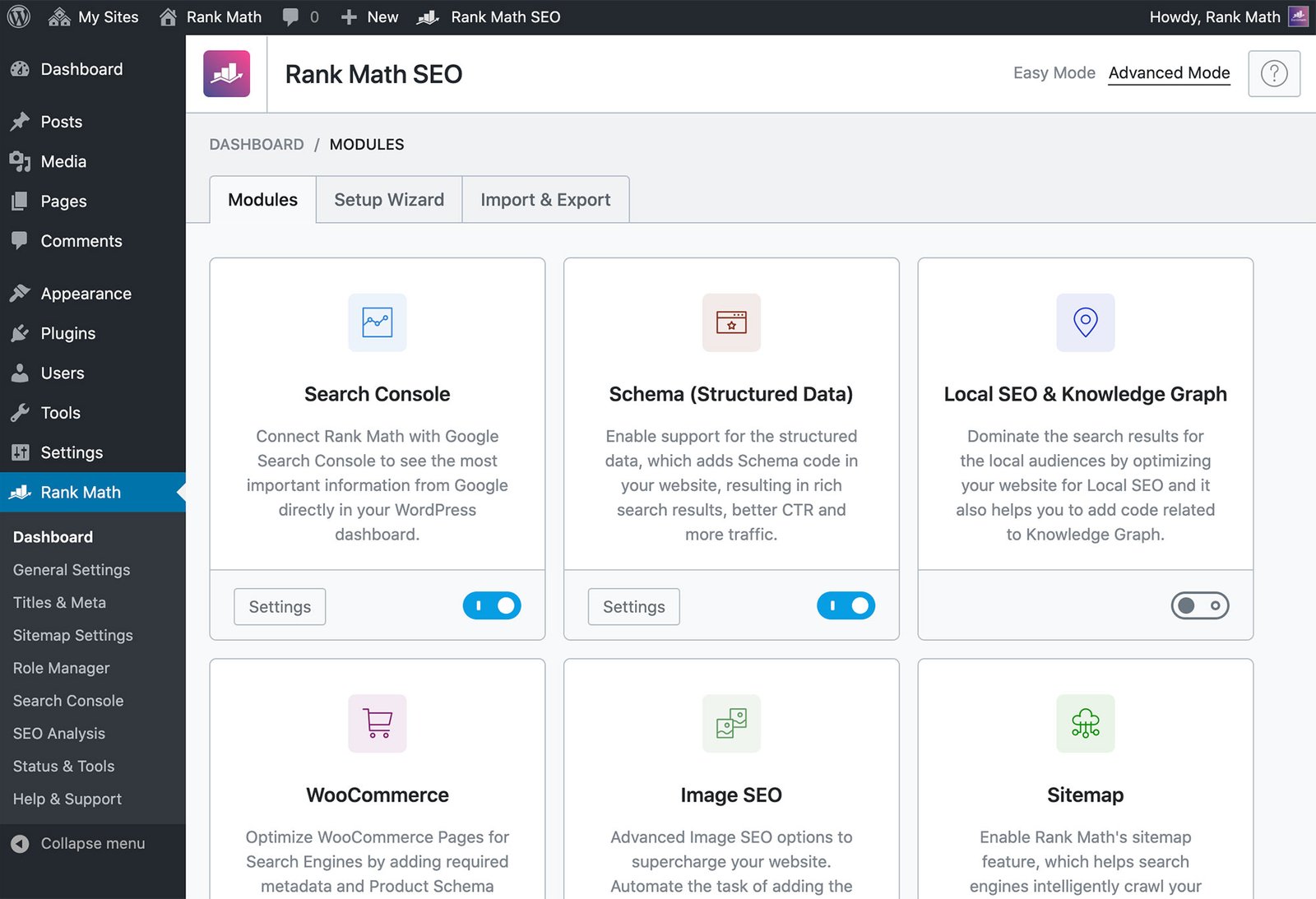
The free plugin covers the essentials — install it, turn on the Local SEO module if you have a physical location, and connect it to Search Console. Pro is $7.99 a month billed annually ($95.88 the first year). Content AI is a separate subscription from $5.99 a month. Install it on every WordPress small-business site. Skip it only if you’re not on WordPress.
8. Google Search Console — free, and the only tool that tells the truth
Verdict: worth it — it’s free, and every other tool here is guessing compared to it.
Search Console is the only tool here that gets its data straight from Google about your own site: which queries brought clicks, which pages got impressions, your average position, what’s indexed, what’s broken, and whether Google’s crawlers — including the AI bots — can reach your pages.

It tells you what happened, not what to do. That’s why it pairs with everything else. The weekly habit: open Performance, sort by impressions, and look for queries where you rank on page two (positions 11 to 20). One round of edits can push those onto page one. No paid tool needed. Use it starting today. It’s free.
How to track AI Overviews and ChatGPT mentions
Google’s AI Overviews now appear on more than 80% of searches, and on 86% of question searches. Google announced in October that it’s putting more clickable links inside those answers and testing a section for official websites. A clear, direct answer on your page can now get cited, not just ranked. The November core update — running since 10 November, about two weeks — is shuffling rankings meanwhile, so don’t judge any change until at least a week after it finishes.
- Search Console first. If a page gets impressions but few clicks, an AI Overview may be answering above you — rewrite the opening to answer the question directly in 40 to 60 words.
- Surfer Standard or Frase Professional for prompt tracking across ChatGPT, Perplexity, and Google AI. Pick 10 to 20 prompts your customers actually type and check them weekly.
- Watch for OpenAI’s Business Hub. A “Claim your business in ChatGPT” screen was spotted in early November 2026; it isn’t live yet, but when it ships, claiming your business there will matter. ChatGPT already handles roughly one-fifth as many search-like queries as Google.
One warning: a citation is not a customer — judge the work by calls, bookings, and sales, not by how often a chatbot mentions you.
What I’d buy at three budgets
$0 a month. Search Console, Rank Math free, Ahrefs Webmaster Tools — errors, queries, on-page basics, for an hour a week.
About $50 a month. Frase Starter ($39 annual) if writing is the bottleneck — or BrightLocal Track ($31 annual) if you’re local; the map grid earns its keep faster than any keyword tool. SE Ranking no longer fits a $50 budget since its late-2026 price rise.
About $150 a month. Pick one suite: Semrush SEO ($117.33 annual) or SE Ranking Core ($103.20 annual). Add Surfer Discovery ($49 annual) only if you write every week — Semrush plus Surfer runs over $150, so choose. Don’t buy two suites — the second one’s data overlaps the first by 80%.
FAQ
What is the best AI SEO tool for small business?
SE Ranking at $103.20 a month annual. Frase if writing is the bottleneck. Semrush is the best tool overall, but at $139 a month it’s for businesses already earning from Google.
Is there a genuinely free AI SEO tool for small business?
Yes. Google Search Console is completely free. Rank Math’s free plugin covers on-page SEO, and Ahrefs Webmaster Tools gives a free audit and backlink check for sites you own.
How much should a small business pay for AI SEO tools?
Start at $0. If you pay, $39 a month buys a good tool — Frase Starter on annual billing. A full suite starts at $103.20 a month (SE Ranking Core, annual billing). Over $100 a month must earn its keep first.
Which AI SEO tool is best for local businesses?
BrightLocal. Pair it with Search Console (free) and Rank Math free for the whole local stack at $31 a month annual.
Bottom line
Start free: Search Console, Rank Math free, Ahrefs Webmaster Tools. When you’re ready to pay, SE Ranking Core at $103.20 a month annual is the one-tool answer, Frase Starter at $39 if writing is the hard part, BrightLocal Track at $31 if you’re local. Semrush is the best tool here and the hardest to justify — buy it when Google brings you leads, not before.
The tool matters less than the habit: one audit a month, one optimized post a week, one look at the map grid. For the wider picture, start with our best AI marketing tools for small business — who writes these guides is on our About page. If writing is your bottleneck, our AI content writing tools for small business guide covers that side, and our AI social media content generator for small business guide covers getting content out.
Enjoying ToolsBizAI guides?
Add us as a Preferred Source on Google — you'll see our latest tools and guides first in Search, Top Stories, and AI Overviews.
Get One Useful AI Tool Tip Every Week
One practical AI tool tip in your inbox every week. No spam, unsubscribe anytime.

We’re the team behind ToolsBizAI. We hands-on test AI tools for small businesses — signing up for free plans, taking real screenshots, and fact-checking every claim before publishing. Our guides cover marketing, customer support, and day-to-day operations.