

I Set Up 3 AI Workflow Automation Tools for My Small Business (2026)
If your small business runs on copy-paste — orders retyped into invoices, leads copied into a CRM — AI workflow automation tools for small business are the fix. They watch for one thing to happen in one app, then do the next five things for you.
AI workflow automation tools for small business connect your apps so one trigger — a new order, a new lead, a new form submission — runs a chain of steps automatically, with an AI step in the middle when the work needs judgement. Zapier is easiest to start, Make is cheapest at real volume, n8n cheapest of all if someone technical runs it.
In this guide you’ll find: Zapier, Make, and n8n priced end to end, one workflow built three ways, the cost at 100, 500, and 1,000 runs a month, and the AI agents worth watching.
TL;DR
- Zapier — worth it for the fastest start and widest app library. Free: 100 tasks/month; Pro from $19.99. Skip it at high volume.
- Make — worth it if you can spend an evening learning a visual canvas. Free: 1,000 credits/month; Core from $12. Best value at real volume.
- n8n — worth it if someone technical will own a server. Free to self-host, unlimited executions; cloud Starter €20/month for 2,500 executions.
- The one number that matters: the same 5-step workflow at 1,000 runs a month costs $89 on Zapier, $12 on Make, and €20 on n8n cloud.
How we tested
I read the official product and pricing pages for Zapier, Make, n8n, Lindy, and Gumloop on 12 November 2026. I did not run card-walled trials or paid accounts — setup paths are mapped from official docs, setup times are estimates, and every price was checked on an official pricing page.
What is AI workflow automation, actually?
Strip away the marketing: when X happens, do Y — and let AI decide the tricky middle bit. A plain automation moves data; an AI automation adds judgement — it reads a new email and routes it.
Zapier counts tasks — every successful action step. Make counts credits — mostly one per module. n8n counts executions — one per complete run. A six-step workflow at 1,000 runs a month is 6,000 tasks on Zapier, about 6,000 credits on Make, and 1,000 executions on n8n.
Before you buy, name the three tasks eating your week — if you can’t name the task, no tool will save you. For the wider picture, our best AI productivity tools for small business guide covers the full stack these automations sit in.
The 3 tools at a glance
| Zapier | Make | n8n | |
|---|---|---|---|
| In one sentence | No-code, 9,000+ apps | Visual canvas | Self-hostable node builder |
| Bills per | Task (each action step) | Credit (1 per module) | Execution (one full run) |
| Free plan | 100 tasks/mo, 2-step Zaps | 1,000 credits/mo, 2 scenarios | Self-hosted, unlimited executions |
| Paid from | $19.99/mo (Pro, 750 tasks) | $12/mo (Core, 10,000 credits) | €20/mo (Starter, 2,500 executions) |
| Best for | Non-technical owners | One tech-savvy staffer | Technical owners |
| Verdict | Worth it to start | Best value at volume | Worth it with a server owner |
Zapier: the fastest start, and the meter that bites later
Verdict: worth it — if you want something live by Friday. Skip it as the permanent home for a workflow that fires hundreds of times a month.
Zapier is the tool most small businesses meet first. It connects to more than 9,000 apps — even the awkward one your accountant insists on. Copilot drafts the workflow from plain English.
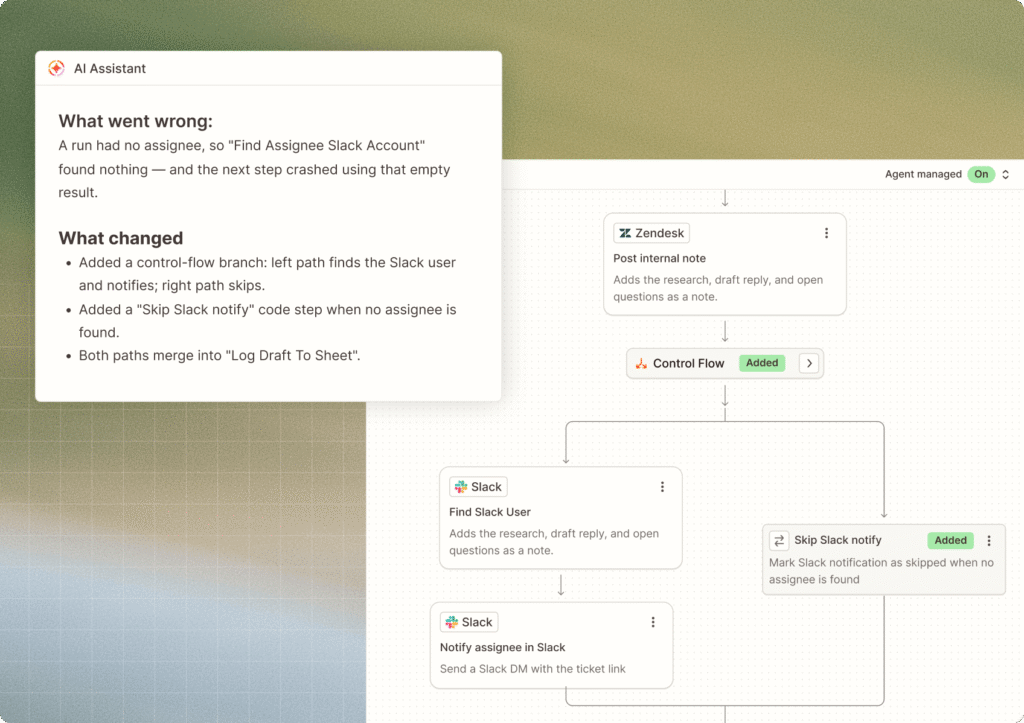
Setup: sign up free (email only, no card — a 14-day Professional trial starts automatically). Pick a trigger — Shopify, “New Order” — then add your steps: Slack, QuickBooks Online, HubSpot, Gmail, Google Sheets. It stalls in two places: the free plan caps Zaps at two steps, so a five-step workflow can’t be built until you pay; and each app needs its own sign-in, with premium apps needing a paid plan first.
Pricing: free forever — 100 tasks a month, two-step Zaps, Copilot included. Professional starts at $19.99 a month billed annually ($29.99 monthly) for 750 tasks; 1,500 tasks $39, 2,000 $49, 5,000 $89 a month. The catch: every step is a task, and AI steps cost 1–5 tasks. A trigger, a formatter, an AI step, and two write-backs burn five tasks per run — at 500 orders a month, that’s 2,500 tasks, and you’re on the $89 tier.
AI features: Copilot builds workflows from plain English; AI fields summarise or draft inside a Zap. Zapier Agents is a separate meter: free for 400 activities a month; Agents Pro $33.33 a month billed annually for 1,500 activities. Agent activities don’t use Zap tasks.
Make: the visual canvas that costs less once you learn it
Verdict: worth it — the best value in this guide at real volume. The learning curve is real, but it’s an evening, not a course.
Make (formerly Integromat) is Zapier’s stronger cousin. Where Zapier is a list of steps, Make is a canvas: drag modules onto a board, draw the connections, and see the whole workflow at a glance — branches, filters, and error paths included.
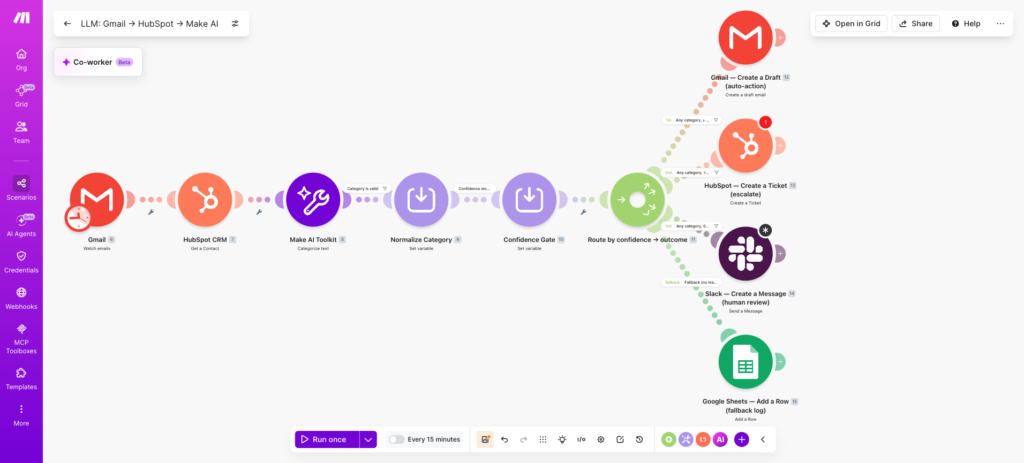
Setup: sign up free (email only). Create a scenario — Make’s word for a workflow. Add your first module: Shopify, “Watch New Orders”. Then add modules: Slack, QuickBooks, HubSpot, Gmail, Google Sheets. Drop in a Router to split the flow or a Filter for orders over a value you set. Test it once, then schedule it. Where it stalls: the canvas itself. Expect your first scenario to take an evening.
Pricing: Make bills in credits. Free: 1,000 credits a month, two active scenarios, 15-minute minimum interval. Core starts at $12 a month billed annually ($16 billed monthly) for 10,000 credits; Pro is $21 a month annual ($28 monthly) for the same 10,000 credits plus priority execution. All paid plans start at 10,000 credits — the price buys features, not volume. One honest flag: a few guides still list Core at $9 a month — the live price on 12 November 2026 is $12. Check the live page before you pay.
The meter: most modules cost one credit per run. Triggers cap at one credit; Routers and error handlers cost nothing. Our workflow costs six credits per order — 1,000 orders is 6,000 credits, inside the $12 Core plan. AI features come as the AI Toolkit and the AI Provider — modules that call a language model mid-scenario. Warning: some AI Provider features use more than one credit.
n8n: the cheapest bill in the guide, if you’ll own a server
Verdict: worth it — if someone in the business is comfortable with a terminal. Skip it if nobody wants to own a server, because an unpatched box running customer data is worse than a monthly fee.
n8n is the odd one out: free to self-host at its core, node-based instead of step-based, and priced per workflow run instead of per step. That one pricing decision changes everything at volume.
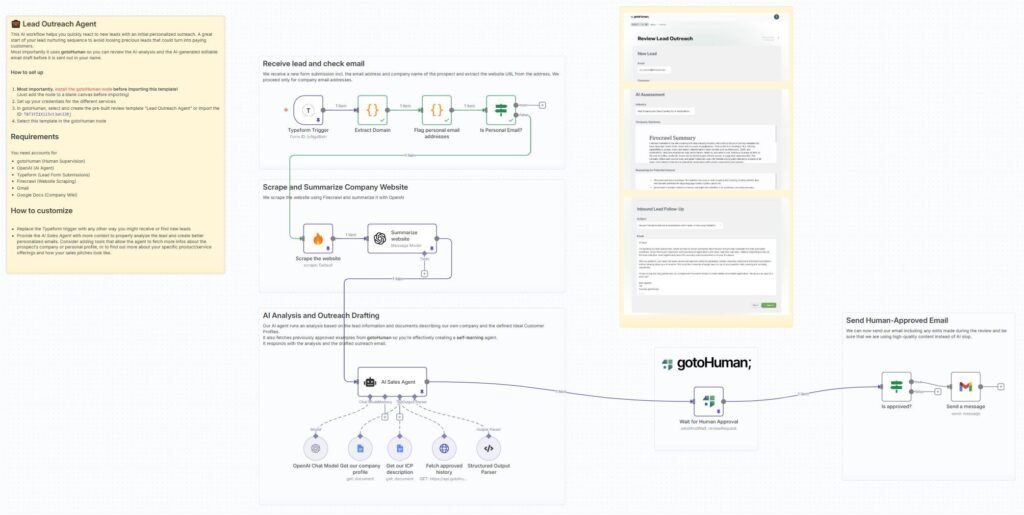
Setup: two routes. Cloud: sign up, start a trial, and you’re on a blank canvas — pick the Shopify trigger, add your nodes, connect accounts, test, publish. Self-hosted: install the free Community Edition on a small server (a $5-a-month VPS does it), but you own the updates and the 2 a.m. errors. Where it stalls: at the start. Nodes assume you know what a webhook is. Budget a weekend self-hosted, an evening on cloud.
Pricing: the Community Edition is free to self-host with no execution limit at all — the actual reason a small business picks n8n. Cloud pricing, from n8n’s own page: Starter is €20 a month billed annually for 2,500 executions, Pro is €50 a month for 10,000 executions. Every cloud plan includes unlimited users and workflows — only execution volume moves the bill. One execution is one complete run of a workflow, however many nodes it has. Only successful executions count, but hit the cap and workflows stop completely until the cycle resets. Set the cap alert on day one.
AI features: the AI Agent node lets a model decide which tools to use and in what order, wired to chat-model nodes for OpenAI, Claude, Gemini, and others. Pro includes an AI-credit allowance. For judgement-heavy automation, n8n gives the most AI per dollar — if someone technical drives it.
The same workflow, built three ways
Here’s the workflow I used for the comparison: a new Shopify order comes in, the team gets a Slack ping, the invoice is created in QuickBooks Online, the customer is added or updated in HubSpot, and a thank-you email goes out from Gmail. Five steps after the trigger — the same on all three tools.
| Step | Zapier | Make | n8n |
|---|---|---|---|
| Trigger | Shopify trigger | Shopify trigger | Shopify trigger |
| Notify | Slack message | Slack module | Slack node |
| Invoice | QuickBooks invoice | QuickBooks module | QuickBooks node |
| CRM | HubSpot contact | HubSpot module | HubSpot node |
| Gmail send | Gmail module | Gmail node |
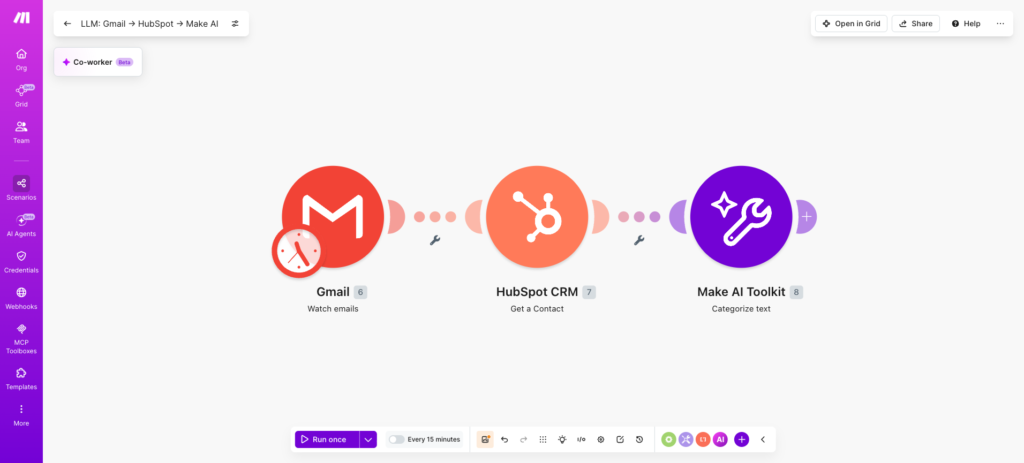
The build feels different on each: Zapier is a list you scroll, Make is a canvas you read, n8n is a graph you trace.
What it actually costs at real volumes
The build is one cost. Running it is the other — and it’s where the three bills diverge.
| Orders/month | Zapier | Make | n8n |
|---|---|---|---|
| 100 | $19.99 (Pro, 750 tasks) | $0 (free, 1,000 credits) | €0 (self-hosted) |
| 500 | $89 (Pro, 5,000 tasks) | $12 (Core) | €20 (Starter) |
| 1,000 | $89 (Pro, 5,000 tasks) | $12 (Core) | €20 (Starter) |
Two caveats. First, free plans don’t run this workflow: Zapier’s free plan caps Zaps at two steps, and Make’s free plan allows only two active scenarios with a 15-minute interval. Second, the bill grows with steps, not orders — add an AI step and Zapier charges 1–5 more tasks per run, Make charges extra credits, n8n charges nothing extra.
Which is best for you?
- Pick Zapier if nobody on your team wants to learn a new tool. It’s the fastest from zero to a working workflow, and the app library covers the awkward corners. Pay the meter with your eyes open.
- Pick Make if one person can own it and learn the canvas. Best value at real volume, and the visual view makes debugging honest work instead of guesswork.
- Pick n8n if someone technical is on the team and happy to own a server. Cheapest bill in the guide — free to self-host — and the strongest AI features for the money.
AI agents are the next step — with a warning
The shift in late 2026 is from step-by-step automations to agents that decide their own steps. Zapier Agents runs a small autonomous worker that reads email and drafts replies; free for 400 activities a month. Lindy builds agents from a prompt — “handle inbound sales emails” — with $50 of free credits for 7 days, then from $29.99 a user a month for 3,000 credits. Gumloop is a visual agent builder: type what you want and it builds the flow; Pro is $37 a month for 20,000 credits, 14-day trial.
n8n’s AI Agent node is the cheapest route to the same idea — a model that picks its own tools inside a workflow you control. For the marketing side of the same stack, see our best AI marketing tools forsmall business; and if the replies need to happen on your website instead of email, our best AI chatbots for small business covers that side.
Honest note: none of these agents are set-and-forget. They need the same care as a new hire — clear instructions, a test run, and someone checking the first week of output.
Also worth a look
Three more tools are worth a sentence each. Microsoft Power Automate fits businesses already living in Microsoft 365 — Premium is $15 a user a month, and it talks to SharePoint and Teams natively. Pabbly Connect sells a one-time deal: $249 for 3,000 tasks a month for life, which is cheap if you’ll still be running it in three years. HubSpot’s workflow tools are the right call if your CRM is already HubSpot — the automation lives where your contacts live. And one warning: Relay.app shut down in September 2026 — its accounts and workflows were deleted. If an old guide still recommends it, that guide is out of date.
When NOT to automate
Automation is the wrong tool when the task changes every time, when it needs a human’s judgement on every run, or when it touches a customer relationship you actually want to be personal. A handwritten thank-you to your tenth customer beats a template every time. Automate the repetitive, keep the personal personal.
FAQ
How much does AI workflow automation cost for a small business?
Free to about $90 a month. A five-step order workflow at 1,000 runs a month costs $89 on Zapier, $12 on Make, and €20 on n8n cloud — or €0 self-hosted.
Do I need a developer to set up workflow automation?
No for Zapier and Make; yes for n8n self-hosted. Zapier needs no code. Make takes an evening to learn. Self-hosted n8n needs someone comfortable with a server.
Is Zapier or Make cheaper?
Make, at almost any volume above the free plans. The same workflow at 1,000 orders a month costs $89 on Zapier and $12 on Make.
What happens if I hit my plan limit?
Your workflows stop or pause. Zapier stops Zaps or asks you to upgrade; Make pauses scenarios; n8n cloud stops until the cycle resets. Set usage alerts on day one.
Are AI agents safe for a small business?
Yes, with guardrails. Give an agent narrow permissions, test it, and check its first week of output. Never let it message customers without a human review step.
The bottom line
Start with Zapier if you want it live this week. Switch to Make when the bill starts to sting. Move to n8n when someone technical joins and wants the cheapest bill in the guide. Pick one task, automate it, and measure the hours it gives back. We test every tool the same way — our approach is on the About page.
Enjoying ToolsBizAI guides?
Add us as a Preferred Source on Google — you'll see our latest tools and guides first in Search, Top Stories, and AI Overviews.
Get One Useful AI Tool Tip Every Week

We’re the team behind ToolsBizAI. We hands-on test AI tools for small businesses — signing up for free plans, taking real screenshots, and fact-checking every claim before publishing. Our guides cover marketing, customer support, and day-to-day operations.